
Technical SEO for Founders: What to Fix First
Most technical fixes barely move rankings. Ranked by severity, so you fix the few that actually cost you traffic first.
 By David Jubé · Jun 19, 2026 · 14 min read
Fifty flagged issues come back from a typical technical SEO audit, and most of them move nothing. One of them, an accidental “noindex” tag, can keep you invisible no matter how good your content is. The difference between those two is severity, and severity is the only order a founder should fix in.
Technical SEO is the work that lets search engines find, crawl, read, and trust your site, separate from the words on the page. Search engine optimization (SEO) is the broader discipline of earning organic rankings; the technical layer is whether engines can even reach you. Trust, in particular, leans on signals from beyond your own site, which is why earning authority through backlinks on no budget sits alongside the technical foundation rather than on top of it.
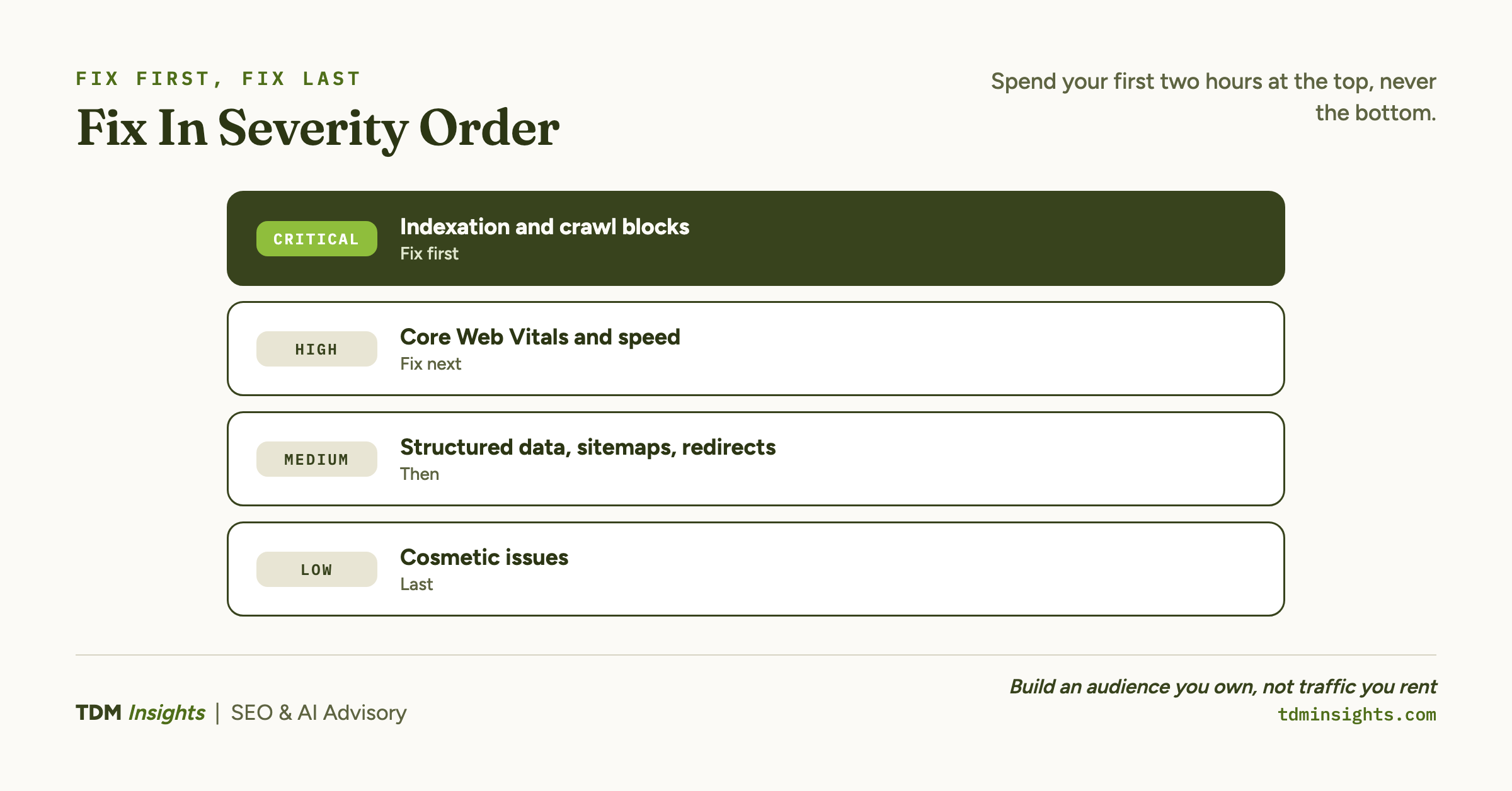
Here is the short version. Fix in severity order, which the next section makes the full case for. There are four tiers:
- Critical: indexation and crawl blocks, the precondition for everything else.
- High: Core Web Vitals and site speed. Real, but second-order to being indexed.
- Medium: structured data, sitemaps, redirects. Margin wins, not the thing keeping you invisible.
- Low: cosmetic issues audit tools shout about and founders over-fix.
A noindex tag costs you everything. A missing image alt costs you almost nothing. On one site we ran, Google search impressions grew 10.1x in 28 weeks, a curve walked through at the end of this article.
Key takeaways
- Fix technical SEO in severity order across four tiers: Critical indexation first, then High-tier Core Web Vitals and speed, then Medium structured data and sitemaps, and cosmetic Low items last.
- Indexation is binary, so the Critical tier comes first: confirm your pages appear by searching site:yourdomain.com, because an accidental noindex tag or robots.txt block makes content invisible no matter its quality.
- Resist the Low-tier trap of fixing dozens of cosmetic red flags like alt text or long meta descriptions first, since they move rankings by fractions while a buried noindex block costs everything.
- Technical sequencing produced real results on The Gourmet Host, where Google impressions grew from 59,643 to 600,569 in 28 weeks, a 10.1x lift, only because the site was crawlable and indexable before content scaled.
The short answer: fix in severity order, not list order
The whole point of technical SEO is sequence. An audit tool prints issues in whatever order it found them, often alphabetical or by page. That order has nothing to do with what is actually costing you rankings.
Those long issue lists come from audit tools: Google Search Console plus crawlers like Screaming Frog, Ahrefs Site Audit, or Semrush Site Audit. Each one labels severity by its own rules, which rarely match what actually costs rankings. That gap is exactly why you fix by real severity, not by the order a tool printed.
Severity is the order that matters. Two checks make the case. First, indexation is binary: a page Google has not indexed cannot rank at any position, for any query, ever.
Second, speed and structure are gradient signals: a slow indexed page still ranks, just lower. So a noindex block is infinitely more urgent than a slow image, even though both show up as one line on the same report.
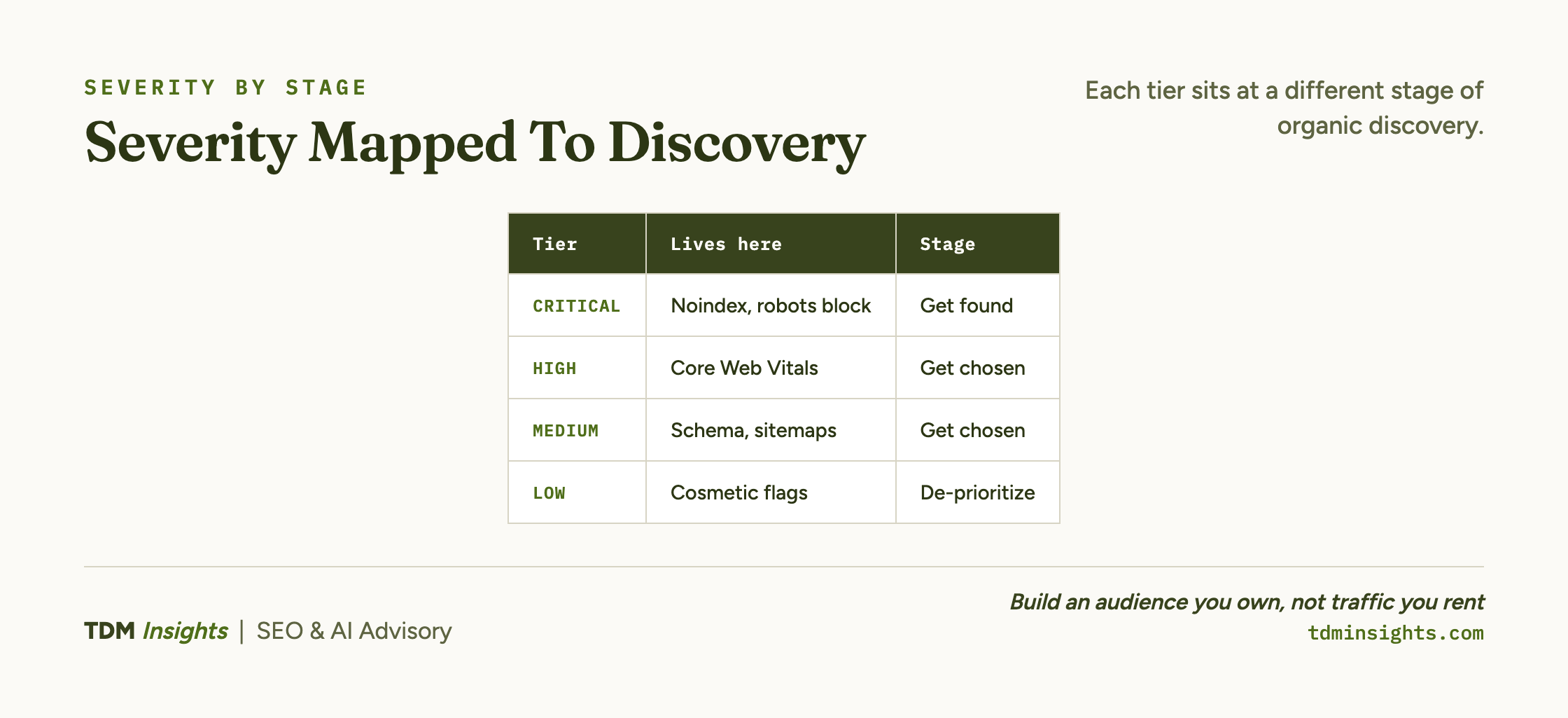
Here is the triage, mapped onto the three stages of organic discovery (getting found, getting chosen, and getting customers):
A founder with two hours should spend them at the top of that table, never the bottom. The rest of this article walks each tier, then shows what the sequence looked like on a real site.
What “technical SEO” actually means for a non-engineer
Technical SEO is the plumbing. Content is what you say; technical SEO is whether Google can hear you say it. It covers indexability, crawling, site speed, mobile rendering, site structure, and structured data.
You do not need to know how to code to do most of it. On a small site, the high-impact work is configuration, not engineering: confirming you are indexed, checking nothing carries an accidental noindex, submitting a sitemap, compressing images, and verifying the site renders on a phone. Platforms like WordPress, Shopify, Wix, and Squarespace handle much of this basic configuration for you, though the amount of control differs by platform, as the four major platforms compared lays out.
It helps to separate technical SEO from on-page SEO. On-page SEO is the content and its signals: titles, headings, keywords, internal links on the page itself. Technical SEO is whether engines can reach and process that page at all.
On-page decides if you deserve to rank. Technical decides if you are even eligible.
For an implementation-side foundation if you run WordPress, Yoast’s definitive WordPress SEO guide covers the configuration layer in plain language. For a structured walkthrough of the four pillars (discover, crawl, index, and user experience), Conductor’s in-depth guide to technical SEO is a solid founder-level orientation.
The Critical tier: can Google index you at all
This is the binary tier: index or invisible. The most common Critical failure is a single accidental noindex tag, often switched on during development or left on by a theme setting, that tells Google to keep a page out of results entirely.
The second most common is a robots.txt rule that blocks your own site from being crawled. Both are invisible to you as the owner: the site looks fine in your browser while Google quietly ignores it.
Run one check right now. Search site:yourdomain.com in Google. If nothing comes back, you are not indexed, and that is the only problem worth your attention until it is solved.
Why a site is not indexed walks the full ordered diagnostic: an emergency, likelihood-ranked walk through every reason a site stays invisible.
There is a calmer structural companion to that emergency. Founders of small sites often worry about crawl budget when their real issue is plain indexation, and crawl budget on a small site sorts the two out.
If your site is under a few thousand pages, crawl budget is not your problem; indexation is. Indexable, well-structured pages are also what determines how AI answer engines choose their sources, so getting found is the precondition for getting cited too.
The High tier: Core Web Vitals and site speed
Once Google can index you, speed and page experience become the next lever. This tier is real, but second-order, the gradient signal behind the binary one.
Core Web Vitals are Google’s three measurements of how a page feels to a real visitor: how fast the main content loads, how quickly the page responds when tapped, and how much it jumps around while loading. They are a confirmed ranking signal, but Google treats them as a tiebreaker between similarly relevant pages, not a primary factor. Core Web Vitals in plain English breaks down each metric.
Speed is the action side of the same tier. A perfect score is not the goal; passing the thresholds is. A handful of fixes do almost all the work, and the site-speed fixes that move rankings rank them by impact per hour so you never burn time chasing diminishing returns.
Speed and page experience are part of what separates a site that gets found from one that gets chosen, and a fast, clean page is also more extractable, which is the foundation of answer-first writing and schema for AI.
The discipline here is restraint. Hit the “good” thresholds, confirm the site renders on mobile, and move on. Do not let a performance tool talk you into a week of work that moves a tiebreaker by a fraction.
The Medium tier: structured data, sitemaps, redirects
Medium-tier work is genuine upside that rarely keeps a founder invisible. Structured data is the headline item here.
Structured data is code, usually JavaScript Object Notation for Linked Data (JSON-LD), that labels what your content means so engines understand it: this is a product, this is its price, this is a review. It does not raise rankings directly. What it does is make you eligible for richer-looking results (star ratings, FAQ accordions, breadcrumbs) and makes your content easier for both Google and AI answer engines to extract.
For most small businesses, a short list of schema types earns nearly all the value. Structured data, the 80/20 covers which types to add and which to skip. The rule for this tier: do it once your site is indexed and reasonably fast, and not before.
Schema is also where technical SEO starts to overlap with content depth, because the markup only helps pages that actually deserve to be found, a point developed in content that ranks and gets cited by AI.
Sitemaps and redirects round out the tier. An XML sitemap helps Google discover your pages, and clean redirects preserve ranking signals when URLs change. Both are worth getting right, neither is worth panicking over before the Critical tier is clean.
Book a free diagnosis
Reading the tiers is one thing. Knowing which tier your own site is actually leaking on is another, and it is the part founders almost always guess wrong. We run a free diagnosis on your real site: we confirm whether you are indexed, where your Core Web Vitals stand, and whether your structured data is doing anything. No pitch, no audit fee, just a straight answer on which tier to fix first.
The Low tier: what audit tools shout about that you should ignore for now
The Low tier is the trap. Audit tools flag dozens of cosmetic items (missing alt text on a decorative image, a meta description a few characters too long, a single broken link to an external site) and they flag them loudly, often in red.
That visual urgency is the problem. A founder opens the report, sees forty red items, and starts fixing the easy ones at the top because they are easy. Meanwhile a Critical noindex block sits two pages down in the same report, untouched, costing them everything.
The fix is the triage rule. Low-tier items are real, but they are last. They move rankings by fractions, and many never move anything at all.
If you have cleared the Critical and High tiers and still have spare time, do the Low items. If you have two hours and an unindexed homepage, the Low tier does not exist.
This is exactly why a flat checklist can hurt a founder: it presents a Critical noindex and a Low alt-text gap as equal line items. The severity-ranked technical checklist lists these issues with severity attached. Severity order applies to content too: a connected library compounds far harder than scattered posts, which is the argument in how topic clusters and pillar pages work.
What this looked like in practice: the TGH curve
The severity model is not theory. We ran weekly SEO on a site we operate, The Gourmet Host, and handled the technical foundation before content scaled.
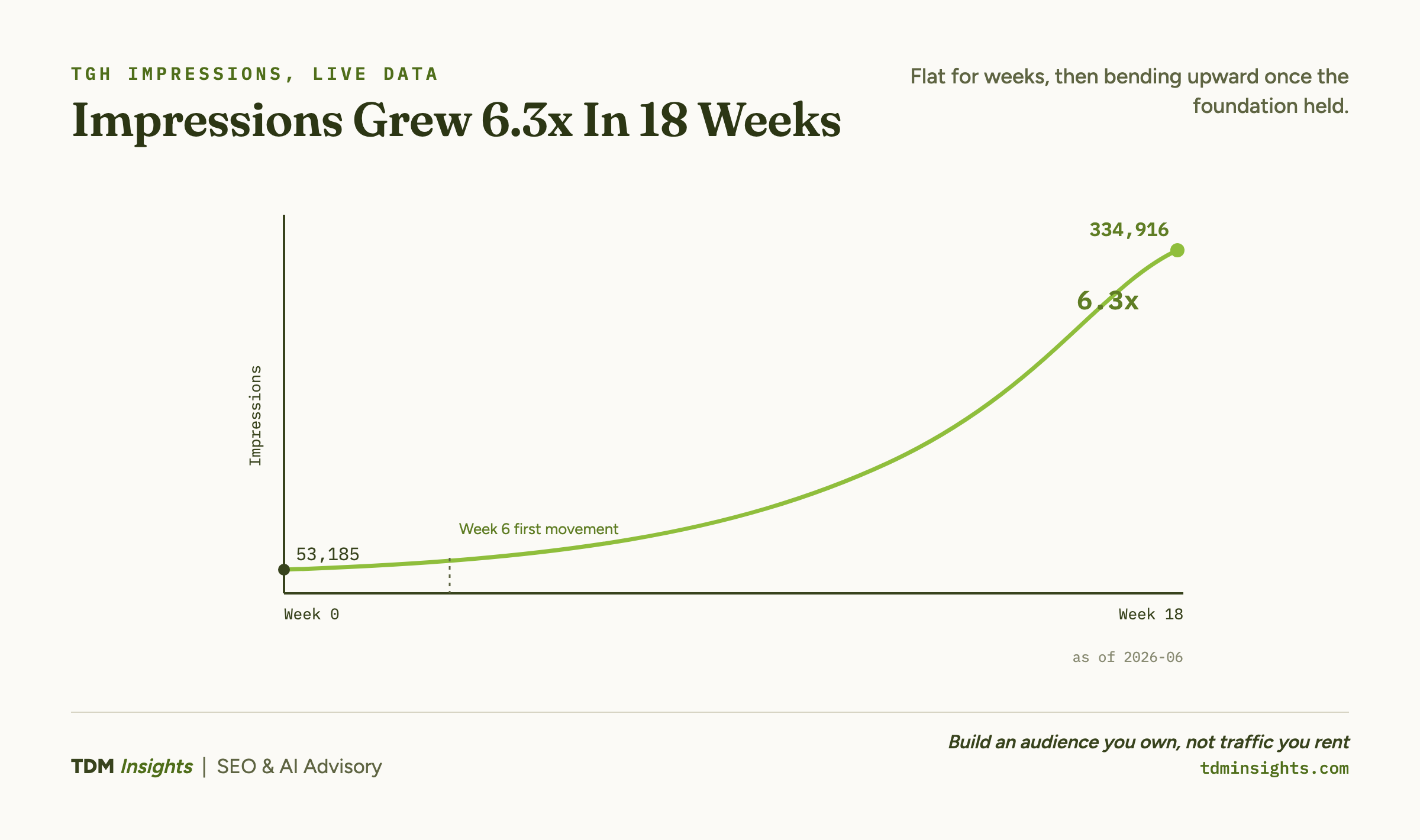
The result: Google search impressions grew from 59,643 to 600,569 in 28 weeks, a 10.1x lift. The first clear movement showed up around week 1, and the curve was still climbing at week 28.
The technical relevance is the whole point. That curve only exists because the site was crawlable and indexable before any of the content was published. Impressions cannot grow on pages Google never indexes.
If the Critical tier had been broken, the same content would have produced a flat line, and we would have concluded the content was the problem when the real problem was a tag.
The shape of that curve (flat for weeks, then bending upward) is also the honest answer to how long SEO actually takes to show results: the technical foundation buys you nothing visible until the content layered on top of it starts to compound.
The lesson is not “technical SEO works.” It is “here is what stays invisible if you skip the Critical tier, and here is the curve you unlock once you do not.”
The same indexable foundation is what later lets you prove the payoff, since measuring AI traffic with no referrer depends on pages engines could reach in the first place.
The two-hour founder triage, and when to get a diagnosis instead
If you have two hours and want to do the highest-leverage technical work yourself, run this:
- Search
site:yourdomain.com. Confirm your important pages come back. If they do not, stop everything and diagnose indexation. - Open Google Search Console‘s Page Indexing report. Read which URLs are excluded and why.
- Run a key page through PageSpeed Insights. Note whether you pass the three Core Web Vitals, and fix only clear failures.
- Confirm the site renders on a phone without breaking.
- Submit your XML sitemap if you have not.
Those five checks surface most severe problems without any paid tool, and the SEO and AI visibility tracking tools are where to look once you outgrow the free baseline. A practical walkthrough of how to run a technical SEO audit in five steps is a good companion if you want to go deeper on your own. For a broader resource hub on what technical SEO covers, Conductor’s technical SEO resources collects the topic in one place.
Get a diagnosis instead when the two-hour pass turns up something you cannot explain, when the site is large or legacy, or when your own hours are simply worth more on product and sales. That last case is really the question of whether SEO is worth it for a startup at all right now, and the honest answer depends on your stage. The point of the diagnosis is to tell you which tier you are leaking on before you spend a week fixing the wrong one.
Frequently Asked Questions
What is technical SEO in simple terms?
Technical SEO is the work that lets search engines find, crawl, read, and trust your site, separate from the words on the page. It covers indexability, site speed, mobile rendering, site structure, and structured data. Think of it as the plumbing: content is what you say, technical SEO is whether Google can hear you say it.
Do I need to know how to code to do technical SEO?
No. Most high-impact technical SEO for a small site is configuration, not coding: checking you are indexed, confirming no accidental noindex, submitting a sitemap, compressing images, and verifying mobile rendering. Platforms like Shopify and Wix handle much of it. You only need a developer for deeper render or server issues, which are rare on small sites.
What is the difference between technical SEO and on-page SEO?
On-page SEO is the content and its signals: titles, headings, keywords, and internal links on the page itself. Technical SEO is whether engines can reach and process that page at all: crawling, indexing, speed, and structure. On-page decides if you deserve to rank; technical decides if you are even eligible to.
What technical SEO tasks should a founder do first?
Start with the Critical tier: confirm Google has indexed your important pages and that nothing is accidentally blocked by a noindex tag or robots.txt. Then handle High-tier speed and mobile issues, then Medium-tier structured data. Fixing in severity order means a founder with two hours spends them on what actually costs rankings.
How do I know if my website has technical SEO problems?
Run three checks. Search site:yourdomain.com in Google to confirm pages are indexed. Open Google Search Console’s Page Indexing report to see which URLs are excluded and why. Run a key page through PageSpeed Insights for speed and mobile. Those three surface most severe problems without any paid audit tool.
How much does technical SEO actually affect rankings?
Technical SEO is foundational rather than additive: indexation is pass/fail, since unindexed pages cannot rank at all, while speed and structure are real but second-order signals. On one site we ran, impressions grew 10.1x in 28 weeks, but only because the site was crawlable and indexable before any content scaled on top of it.
Continue Reading:
More On Technical SEO for Founders
- Core Web Vitals Explained for Non-Engineers
- Why Isn’t My Site Indexed? A Founder’s Diagnostic
- Crawl Budget and Indexation for Small Sites
- Site Speed: The Fixes That Actually Move Rankings
- Structured Data for SEO: The Founder’s 80/20
- WordPress vs Shopify vs Wix vs Squarespace, Compared
- SEO and AI Visibility Tracking Tools, Compared
More from TDM Insights
- How AI Answer Engines Choose Their Sources
- Schema Markup for AI: Answer-First Writing Guide
- How to Measure AI Traffic With No Referrer
- Topic Clusters and Pillar Pages: How They Work
- Content That Ranks and Gets Cited by AI
Explore TDM Insights Categories