
Site Speed: The Fixes That Actually Move Rankings
A perfect PageSpeed score is a trap. The five speed fixes that actually move rankings, plus the lever for each platform.
 By David Jubé · May 14, 2026 · 11 min read
Site speed affects rankings, but not the way the “100/100 or bust” crowd implies. For most founders a handful of fixes do almost all the work, and the perfect-score chase is a trap covered below.
Five changes carry the load, and the fix ladder below ranks them by impact per hour. Everything past those five is diminishing returns a founder should not spend their hours on.
Speed is a High-tier fix, so confirm indexation first using the diagnostic for why a site is not indexed, because optimizing a page Google cannot see is pure waste. A fast page still has to carry something worth loading, ideally built around keyword demand you can actually win, which is the case made in content that ranks and gets cited by AI.
This article gives you the honest answer on whether speed moves rankings, kills the perfect-score myth, and ranks the five fixes by impact per hour, each tied to the metric it improves.
Key takeaways
- Speed is a modest ranking signal Google uses as a tiebreaker between similarly relevant pages, so fix clear speed problems to help users and conversions, never to outrank stronger content.
- A perfect PageSpeed score of 100 is a trap; the real goal is passing the three Core Web Vitals thresholds: LCP under 2.5 seconds, INP under 200 milliseconds, and CLS under 0.1.
- Five fixes do nearly all the achievable speed work, ranked by impact per hour: compress and right-size images, reserve space for images, lazy-load below-the-fold content, cut unused third-party scripts, and add a CDN.
- Images are the single biggest founder-fixable speed win: right-size them, compress them, and serve modern WebP or AVIF formats to improve LCP, but never lazy-load your hero image because that delays the metric.
The answer: speed is High-tier, and five changes do most of the work
Speed influences rankings through Core Web Vitals, the confirmed-but-modest signal explained in Core Web Vitals in plain English. It also influences conversions, which is where speed actually pays a founder back hardest.
Five fixes account for nearly all the achievable gain on a small site, ranked by impact in the fix ladder below. The discipline is stopping after them, because passing the vitals is the bar, not maxing a score.
Technical SEO, fixed by severity places speed in the broader severity model, and Core Web Vitals in plain English explains the metrics these fixes move. A faster, cleaner page is also more extractable, which is part of how AI answer engines choose their sources when they decide what to quote.
Does speed actually move rankings? The honest, evidence-backed answer
Yes, but less than most founders assume, and the evidence is worth being honest about.
Speed is a ranking factor through Core Web Vitals, but Google treats it as a tiebreaker between similarly relevant pages, not a primary signal. The most-cited original data here is Backlinko’s page speed study across 5.2 million pages, which found only a weak correlation between page speed and rankings. That is not an argument to ignore speed; it is an argument to keep it in proportion.
The stronger case for speed is commercial, not ranking. Faster pages convert better and bounce less, and that user behavior matters to your revenue directly and to rankings indirectly.
Conductor’s collection of page speed case studies documents the speed-to-conversion link well. Whatever lift speed contributes, you still have to be able to see it arrive, which is where measuring AI traffic with no referrer becomes the practical confirmation.
So the honest framing: fix clear speed problems because they help users and nudge rankings, never because you believe speed alone will outrank better content. Off-site authority signals matter far more, which is why earning backlinks on no budget outranks a speed tweak for moving position. A page that loads fast still has to do the persuading, which is the job of content that converts readers into customers.
The “perfect score” myth
A PageSpeed Insights score of 100 is not the goal, and chasing it is one of the most common ways founders waste technical time.
Google rewards passing the Core Web Vitals thresholds (LCP under 2.5 seconds, INP under 200 milliseconds, CLS under 0.1), not a flawless lab number. A page scoring in the 80s or 90s that passes all three vitals competes exactly as well as one scoring 100.
Two more things confuse founders here. First, PageSpeed Insights tests on a simulated slower device and connection, so a site that feels fast to you on your laptop can score low; that is the lab reflecting a worst-case visitor, not your experience. Second, the lab score and the field data (real visitor measurements) are different numbers, and the field data is what Google actually uses for ranking.
Hit the thresholds, glance at the field data, and stop. PageSpeed Insights and Search Console are the free way to read both numbers, and the wider set of SEO and AI visibility tracking tools covers what to add when you need more. Sitebulb’s guide to UX and Core Web Vitals optimization frames speed inside user experience rather than as a score to max out.
The effort-to-impact fix ladder
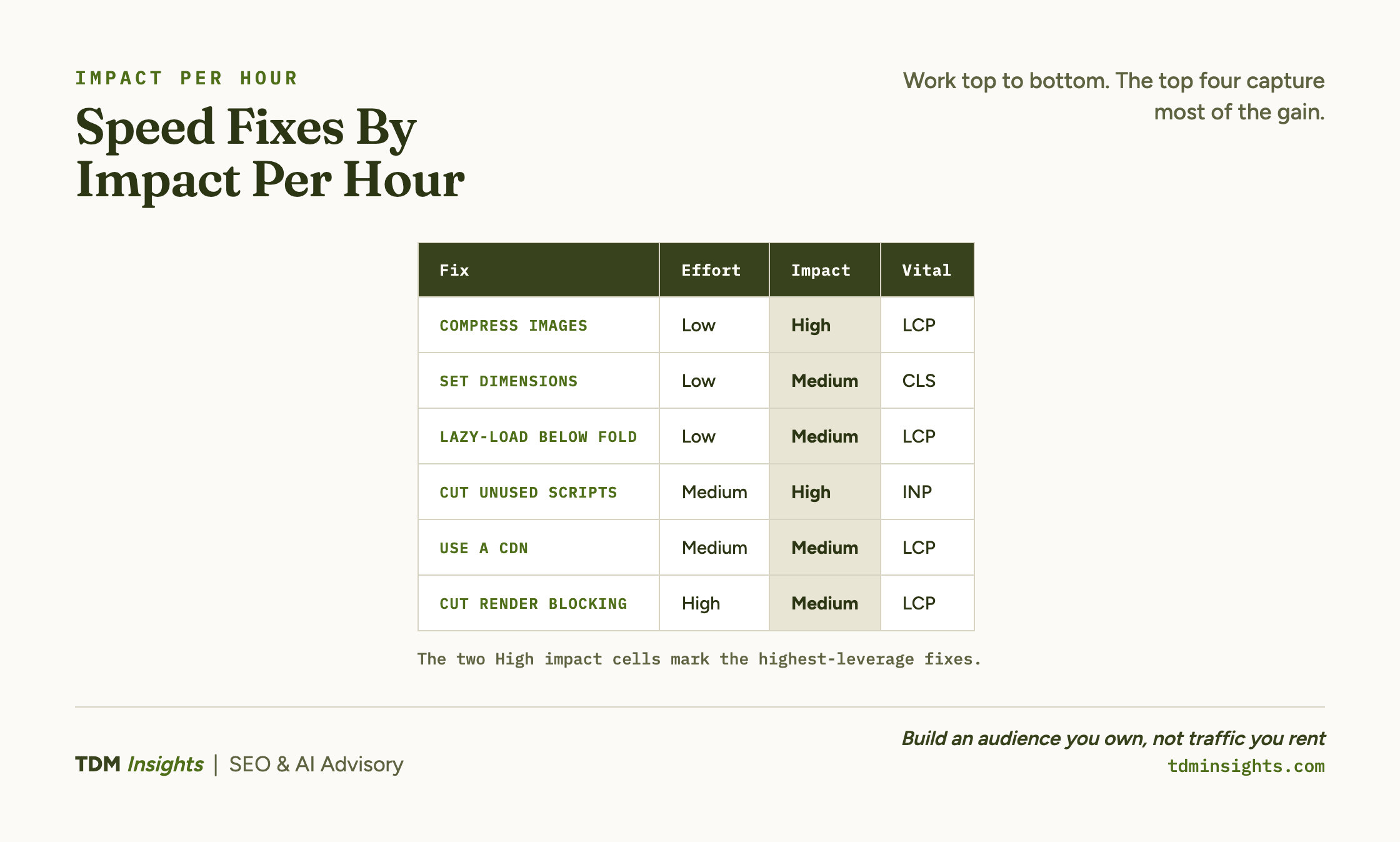
Here are the five fixes, ranked by ranking impact per hour of effort, each mapped to the Core Web Vital it improves:
Work top to bottom. The first three are low-effort and need no developer.
The last one (reducing render-blocking code) is the highest-effort and usually the one to hand to a developer if at all. A founder who does the top four has captured most of the available gain.
Images: the single biggest founder-fixable win
Images are where most small sites lose their speed, and they are the easiest thing to fix without code.
A hero image exported straight from a camera or a design tool can be several megabytes, and that one file can blow your Largest Contentful Paint on its own. Three moves fix almost all of it:
- Right-size. Do not serve a 4000-pixel-wide image into a 800-pixel-wide slot. Resize to roughly the display size.
- Compress. Run images through a compressor or export at a sensible quality. Aim for the smallest file that still looks good.
- Use modern formats. WebP and AVIF are dramatically smaller than JPEG and PNG at the same quality, and most platforms support them.
The primary reference on this metric is web.dev’s guide to optimizing Largest Contentful Paint, which covers images and the render path together. Pair image compression with lazy-loading (telling the browser to load below-the-fold images only when the visitor scrolls to them) and you have addressed the largest single drag on most small-site speed.
One caveat on lazy-loading: never lazy-load your hero or any image above the fold. The hero is usually your LCP element, and deferring it delays the exact thing the metric measures, which makes LCP worse. Lazy-load below-the-fold media only, and let the top of the page load eagerly.
Third-party scripts and app bloat
The second-biggest founder-fixable win is subtraction: removing the scripts and apps you are not using.
Every third-party script (analytics, chat widgets, popups, social embeds, review apps, A/B testing tools) runs in the visitor’s browser and competes for the same resources. Too many of them tie up the browser so it cannot respond quickly to taps, which is what wrecks Interaction to Next Paint.
The audit is straightforward: list every app and script installed, and for each one ask whether it is actively earning its keep. Remove the ones you added “to try” and never used.
On most small sites this single pass measurably improves responsiveness, because founders accumulate apps faster than they remove them. For the broader speed collection from a primary source, web.dev’s build fast, performant sites is the canonical hub, and Conductor’s five ways to fix slow-loading pages is a direct, founder-level companion.
Book a free diagnosis
The five fixes are the same, but which one will move the needle most depends entirely on your site: an image-heavy Shopify store and a script-heavy Wix site have completely different bottlenecks. A free diagnosis runs the speed triage on your actual site, tells you which of the five fixes is your highest-leverage one, and which to skip. No pitch, just the prioritized list, on your real numbers.
Platform reality: WordPress, Shopify, Wix, and Squarespace
Each platform gives founders a different amount of control, so your highest-leverage speed move depends on where your site lives. The table below names the one lever that matters most on each, and the full feature trade-offs sit in WordPress, Shopify, Wix, and Squarespace compared.
Focus your time on the lever you actually control rather than fighting the platform. On the managed three, that means cutting weight; on WordPress, it means choosing a lean host, theme, and plugin set up front.
What needs a developer (and how to brief one)
These five fixes mostly need no developer. A few do, and knowing which saves you from paying for the wrong thing.
Hand to a developer: reducing render-blocking CSS and JavaScript, improving server response time, deferring or splitting heavy custom scripts, and font-loading strategy. These are genuine, but they are the lower-impact end of the ladder for a small site, so do the no-code wins first and only then decide if a developer hour is worth it.
When you do brief one, be specific. Do not say “make the site faster.” Say “PageSpeed Insights flags render-blocking resources on the homepage and our LCP is 4.1 seconds on mobile field data; please address the render path and report the new field LCP.”
Give them the metric, the page, and the target threshold. The severity-aware version of all of this, listing speed alongside every other technical item, is the severity-ranked technical checklist. Speed is also only one input to the bigger plan of what to publish and why, which starts with how much content a site needs to rank and grows into a content strategy built around a library that ranks and gets cited.
Frequently Asked Questions
Does site speed actually affect SEO rankings, and how much?
Yes, but less than most founders assume. Speed influences rankings through Core Web Vitals, a confirmed but modest signal that mostly breaks ties between similarly relevant pages. A faster site also lifts conversions and lowers bounce, which matter commercially. Treat speed as a real High-tier fix, never as more important than being indexed.
Will speeding up my website actually improve my rankings?
It can, but the effect is usually small unless your site is currently very slow. Moving from poor to good Core Web Vitals can help, while shaving milliseconds off an already-fast page rarely changes rankings. Speed’s bigger payoff is user behavior: faster pages convert better and hold visitors longer, which indirectly supports rankings.
Do I need a perfect 100 PageSpeed Insights score to rank?
No. Google rewards passing the Core Web Vitals thresholds, not a perfect score. A page scoring in the 80s or 90s that passes all three vitals competes fine. Chasing 100 means burning hours on diminishing returns. Hit the “good” thresholds, then put your time into content and indexation instead.
Why does PageSpeed say my site is slow when it feels fast to me?
PageSpeed Insights tests on a simulated slower device and connection, while you likely browse on fast hardware with the page cached. The lab score reflects a worst-case visitor, not your experience. Check the field data section for real-world visitor performance, which is what Google actually uses for the Core Web Vitals assessment.
What’s the difference between a PageSpeed score and Core Web Vitals?
The PageSpeed Insights score is a lab number from a single simulated test, useful for diagnosis. Core Web Vitals are based on real visitor data collected over 28 days, and they are what Google uses for ranking. A high lab score does not guarantee passing vitals; the field data is the measure that counts.
What are the speed fixes that actually move rankings?
Five fixes do most of the work: compress and right-size images, lazy-load content below the fold, cut unused third-party scripts and apps, serve assets through a content delivery network, and reduce render-blocking CSS and JavaScript. Images are usually the biggest founder-fixable win. Anything beyond these five is typically diminishing returns.
Continue Reading:
More On Technical SEO for Founders
- Technical SEO for Founders: What to Fix First
- Core Web Vitals Explained for Non-Engineers
- Why Isn’t My Site Indexed? A Founder’s Diagnostic
- Crawl Budget and Indexation for Small Sites
- Structured Data for SEO: The Founder’s 80/20
- WordPress vs Shopify vs Wix vs Squarespace, Compared
- SEO and AI Visibility Tracking Tools, Compared
More from TDM Insights
- Content That Ranks and Gets Cited by AI
- How AI Answer Engines Choose Their Sources
- How to Measure AI Traffic With No Referrer
- Content Strategy for Founders: A Library That Ranks, Gets Cited, and Pays for Itself
- Content That Converts Readers Into Customers
Explore TDM Insights Categories