
Technical SEO Checklist for Founders, by Severity
Ranked by severity so you fix what costs rankings first, plus the Shopify and Wix gotchas. A founder's technical checklist.
 By David Jubé · May 7, 2026 · 16 min read
A technical SEO checklist with 50 unranked items is useless to a founder with two hours. The bulk of those items move nothing.
A handful, like an accidental noindex tag or a robots.txt file that blocks your own site, can keep you invisible no matter how good your content is.
This checklist is ordered by what actually costs you rankings.
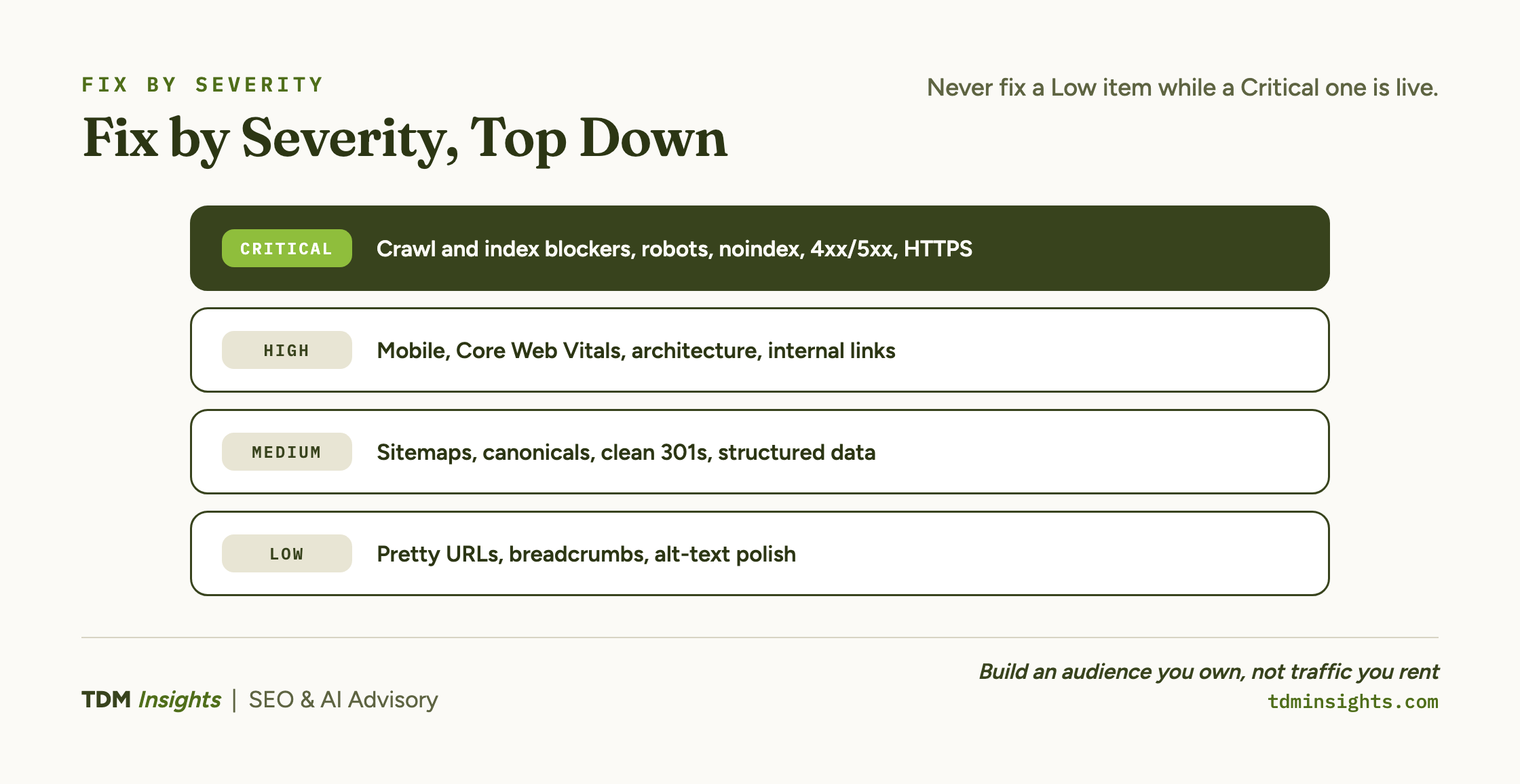
Here is the short version, answer-first, so you can act before you finish reading. Technical SEO (search engine optimization) for a founder splits into four severity tiers.
Critical is anything that stops Google from crawling or indexing your pages at all: if you only fix one tier, fix this one.
High is mobile rendering, page speed and Core Web Vitals, plus site architecture and internal links, which decide whether content that ranks and gets cited reaches its potential or just barely ranks.
Medium is sitemaps, canonical tags, redirects, and structured data: real wins, but only after the first two tiers are clean.
Low is cosmetic polish you can defer indefinitely.
Work top down. A founder with two hours should never be fixing a Low item while a Critical one is live.
The reason this order matters is the same reason sequencing matters across the whole first-90-days plan: technical health is step one of the order of operations, and every later step compounds on it.
You cannot earn a ranking for the demand this foundation lets you rank for if Google never indexes the page that targets it.
Key takeaways
- A technical SEO checklist with 50 unranked items is useless to a founder with two hours, because the bulk of those items move nothing.
- Technical SEO for a founder splits into four severity tiers, and Critical is the only one that can make you invisible: if you fix one tier, fix this one.
- Work top down, because a founder with two hours should never be fixing a Low item while a Critical one is live.
- Core Web Vitals are a real but modest ranking input, which is exactly why they sit in High and not Critical.
- A focused two-hour triage of robots.txt, the indexing report, URL Inspection, and PageSpeed Insights catches most critical problems and puts you ahead of most founder-built sites.
The full checklist, ranked by severity
Here is the whole triage in one table. Scan it, find your lowest-numbered open item, and start there.
The rest of this article works down the tiers and then covers the four platforms most founders run on, WordPress, Shopify, Wix, and Squarespace, because each one creates its own predictable problems.
Critical: can Google crawl and index you at all?
This is the only tier that can make you invisible. Everything else is a question of ranking better; this tier is a question of ranking at all.
Start with robots.txt, a plain text file at the root of your domain that tells crawlers where they may and may not go.
A single misplaced Disallow: / line blocks your entire site, and it is one of the most common self-inflicted SEO wounds on founder-built sites, often left over from a staging configuration that shipped to production. Read yours line by line.
Next, indexability. Google has to crawl a page before it can index it, and index it before it can rank it.
Google documents how Googlebot crawls and discovers pages in its own crawler overview.
The two failure points are a noindex tag that quietly tells Google to drop the page, and a page that simply never got discovered.
Catch both with the URL Inspection tool in Google Search Console: paste a key URL, and it tells you whether the page is on Google, and if not, why.
Finally, confirm the basics: pages should respond with HTTP 200, not 404 (not found) or 500 (server error), and the whole site should be on HTTPS with no insecure assets mixed in.
If a page is Critical-broken, no amount of content or links will save it.
High: mobile, speed, and Core Web Vitals
Once Google can see your pages, the next question is whether they load well, especially on a phone.
Google indexes the mobile version of your site first, so a desktop site that falls apart on mobile is being judged on its weakest version.
Core Web Vitals (CWV) are Google’s three measurable user-experience signals: how fast the main content loads, how quickly the page responds to a tap, and how much the layout jumps around while loading.
They are a real ranking input, though a modest one, which is exactly why they sit in High and not Critical.
A slow or jumpy page rarely outranks a fast competitor on relevance alone, but it does cost you conversions and trust directly.
For the underlying definitions and thresholds, web.dev publishes the canonical reference on Core Web Vitals, and a good practitioner walkthrough of measuring them with Lighthouse and field data lives in this guide to site speed and Core Web Vitals.
The practical founder move: do not chase a perfect 100 score.
Run your top three or four pages through PageSpeed Insights, fix the largest single bottleneck on each (usually an oversized hero image or a render-blocking script), and move on.
High: site architecture and internal links
Architecture is how your pages relate to each other, and it does quiet, compounding work.
A clean structure means every important page is reachable from the homepage in a few clicks, and your most valuable pages collect the most internal links.
Internal links do two jobs at once: they give crawlers paths to find your pages, and they pass topical relevance and importance between pages.
A money page with one internal link pointing at it is being told, by your own site, that it does not matter much.
A practical primer is Siege Media’s guide to internal linking structure, which covers how to flow authority toward the pages that need it.
For a founder, the fastest architecture win is usually this: list your three or four pages that should convert, then make sure each one is linked from your main navigation and from several relevant articles.
Medium: sitemaps, canonicals, redirects, and structured data
These items genuinely help, but only once the tiers above are clean. Fixing a canonical tag on a page Google cannot crawl is wasted motion.
An XML sitemap is a machine-readable list of the URLs you want indexed; submitting it in Search Console helps Google discover and prioritize your pages faster, which matters most on new sites with few external links pointing in.
Canonical tags solve duplicate-content confusion by naming the one “real” version of a page when several URLs show the same content, the single most useful Medium item for ecommerce founders.
Yoast has a clear explainer on how rel=canonical works if you have not set one before.
Redirects should be clean 301s (permanent redirects) with no chains, where one redirect points to another that points to a third. Each hop wastes crawl budget and bleeds ranking signal.
Structured data, also called schema markup, is code that labels your content so search engines and AI systems understand it, which sits at the intersection of the disciplines covered in GEO vs SEO vs AEO vs LLMO.
It can earn rich results and feeds answer engines, which is why it overlaps with the structured data that feeds answer engines work in the AEO cluster. That labeling is one of the inputs behind how AI answer engines choose their sources, so getting it right pays off twice. Validate it with Google’s Rich Results Test before you trust it.
Book a free diagnosis
A technical issue you cannot see is the one most likely to be costing you rankings right now. A stray noindex, a robots.txt left over from staging, a canonical pointing at the wrong URL: any of these can keep good content invisible while you wonder why nothing ranks. A free diagnosis runs the critical tier on your live site and tells you, in plain terms, whether anything is blocking Google from crawling and indexing your pages, and what to fix first. No obligation, just the findings.
Platform reality: WordPress gotchas
WordPress gives you the most control over technical SEO of any platform, which is what makes it the most capable choice for SEO and content and also the easiest to misconfigure. Three things to watch.
First, the site-wide noindex switch. Under Settings, then Reading, a “Discourage search engines from indexing this site” box is meant for development, and left checked on a live site it hides every page from Google.
Second, plugin and theme weight. Every plugin adds code, and a heavy theme stacked with plugins is the most common cause of a slow WordPress site, so keep the stack lean and run a caching plugin.
Third, duplicate URLs from category, tag, and date archives. Install an SEO plugin such as Yoast or Rank Math to set canonicals and noindex the thin archive pages you do not want competing for rankings.
Platform reality: Shopify gotchas
You are almost certainly on a platform rather than a custom build, and each platform creates its own recurring problems.
Shopify is fast and reliable out of the box, which lulls founders into thinking technical SEO is handled. It mostly is, with three specific exceptions.
First, duplicate product URLs. Shopify can serve the same product at both /products/item and /collections/category/products/item, which splits ranking signals across two URLs.
Shopify usually sets canonical tags to consolidate them automatically, but audit that the canonical points to the clean /products/ version, because theme customizations sometimes break it.
Second, the forced URL structure. Shopify locks you into /products/, /collections/, /pages/, and /blogs/ prefixes you cannot fully remove.
This rarely hurts rankings, but it surprises founders migrating from another platform who expected to keep old paths. Plan 301 redirects from old URLs to the new Shopify paths during any migration.
Third, app bloat. Installed Shopify apps inject render-blocking JavaScript on every page, even pages where the app does nothing.
Prune apps you no longer use, and check your speed scores after installing any new one.
Also watch thin automatic tag pages, which Shopify can generate in large numbers; noindex the ones that serve no search purpose so they do not eat crawl budget.
Platform reality: Wix gotchas
Wix has spent years living down a reputation for poor SEO, and the platform has genuinely improved. Modern Wix sites can rank well.
But the visual-editor model creates three things to watch.
First, client-side rendering. Wix builds pages heavily with JavaScript, which can delay when your content becomes visible to a crawler.
Google can render JavaScript, but slower and less reliably than plain HTML.
Use URL Inspection’s “view tested page” to confirm Google actually sees your main content, not an empty shell.
Second, limited control. Wix gives you less granular control over redirects and canonical tags than a developer-grade setup.
You manage them through the platform’s interface rather than directly, so verify that a redirect or canonical actually took effect rather than assuming it did.
Third, page weight. The drag-and-drop editor makes it easy to stack elements that bloat a page and drag down Core Web Vitals.
Keep pages lean, compress images, and remove decorative elements that add load time without meaning. Wix just makes the bloat easier to create by accident.
For a broader founder-level orientation to the technical layer across platforms, Search Engine Journal maintains a solid reference on technical SEO fundamentals worth a read once you have triaged your own site.
Platform reality: Squarespace gotchas
Squarespace is clean and capable for a content-led site, with a strong built-in blog, and it trades some control for that simplicity. Three things to know.
First, you cannot edit robots.txt. Squarespace manages it, so crawl control comes from each page’s settings rather than a file you control.
Second, native structured data is limited. Beyond the basics, custom schema goes in through code injection, which requires a Business plan or higher.
Third, hidden and password-protected pages. A page that is disabled, unlinked, or password-protected will not be crawled, so check its settings if it is missing from search.
The two-hour founder triage
If you have one focused block of time, here is the exact order. This catches the issues that actually matter and skips the ones that do not.
- Read your robots.txt (5 minutes). Open
yoursite.com/robots.txt. Confirm there is no blanketDisallow: /. If there is, that is your whole problem; fix it and re-check tomorrow. - Open the Page indexing report in Search Console (15 minutes). See the count of pages indexed versus excluded, and read the reasons for the excluded ones. This is the single most informative screen in technical SEO.
- Run URL Inspection on three key pages (15 minutes). For your homepage and two money pages, confirm each says “URL is on Google.” Use the live test to see what Google actually renders, which matters most on Wix.
- Run PageSpeed Insights on the same three pages (20 minutes). Note the single biggest issue on each. Usually it is one image or one script. Fix the worst one.
- Confirm your sitemap is submitted and HTTPS is clean (10 minutes). Check the Sitemaps report; check for the browser padlock and any mixed-content warnings.
- Audit the gotcha that applies to your platform (30 minutes). Canonicals and apps on Shopify, rendering on Wix, your SEO plugin and archive pages on WordPress, or per-page crawl settings on Squarespace.
- Write down what you found (15 minutes). A short list of what is broken, tier by tier, so the next session starts where this one ended.
That is roughly two hours, and it puts you ahead of most founder-built sites.
With the foundation set, now earn authority: a crawlable, indexable, fast site is the thing links and content actually compound on.
And technical health is not a one-time fix; keep technical health current as you refresh your published content, because new pages and new apps reopen old problems.
Frequently Asked Questions
What single technical SEO issue should a founder fix first?
Fix indexability first: confirm your important pages are not accidentally blocked by robots.txt or a noindex tag. Nothing else matters if Google cannot crawl and index the page. Use the URL Inspection tool in Search Console to verify each key page returns “URL is on Google” before touching speed or schema.
Can I do a useful technical SEO audit myself in an afternoon?
Yes, a focused two-hour triage catches most critical problems. Check robots.txt and the indexing report in Search Console, run three key pages through URL Inspection and PageSpeed Insights, confirm a sitemap is submitted, and test mobile rendering. This covers crawl, index, speed, and mobile, which is where the severe issues live.
What are the most common technical SEO mistakes on Shopify?
Shopify’s biggest gotchas are duplicate product URLs from collection paths, a forced URL structure (/products/, /collections/) you cannot fully customize, and theme apps that inject render-blocking scripts. Canonicals usually handle the duplication, but audit them, prune unused apps for Core Web Vitals, and check that thin tag pages are not eating crawl budget.
What technical SEO issues are specific to Wix sites?
Wix’s historical slow-indexing reputation has improved, but watch three things: heavy client-side rendering that delays content for crawlers, limited control over redirects and canonical tags, and bloated page weight from the visual editor. Verify rendered HTML in Search Console’s URL Inspection and keep pages lean for Core Web Vitals.
What technical SEO issues come up on WordPress?
WordPress gives the most control, so the issues are self-inflicted: the “Discourage search engines” box in Settings, then Reading, left on after launch; slow load from a heavy theme and too many plugins; and duplicate category, tag, and archive URLs. An SEO plugin like Yoast or Rank Math sets canonicals and noindexes the thin archives.
Can you do good technical SEO on Squarespace?
Yes, with limits. Squarespace covers the basics and has a strong blog, but you cannot edit robots.txt, custom schema needs code injection on a Business plan or higher, and disabled, unlinked, or password-protected pages will not be crawled. Control crawling through each page’s settings rather than a file.
Does Core Web Vitals failure actually hurt rankings, or is it cosmetic?
Core Web Vitals are a real but modest ranking factor, so treat them as high severity, not critical. They rarely outweigh relevance and content quality, but a slow Largest Contentful Paint or jumpy layout hurts conversions and user trust directly. Fix clear failures, but never prioritize them over a page that cannot be indexed.
How do I know if Google is actually indexing my pages?
Use the Page indexing report in Google Search Console to see exactly which URLs are indexed, excluded, and why. For a single page, run it through URL Inspection for a live status. Avoid relying on the site: search operator, which is an unreliable estimate and does not tell you the reason a page is missing.
Continue Reading:
More On SEO for Startups
- SEO for Startups: What to Do in the First 90 Days
- How Long Does SEO Take? An Honest Timeline
- Is SEO Worth It for a Startup? When to Invest and When to Wait
- Keyword Research for Startups: Demand You Can Win
- Backlinks for Startups: Earn Authority, No Budget
More from TDM Insights
- Schema Markup for AI: Answer-First Writing Guide
- Content Refresh: Win Back Rankings You Lost
- How AI Answer Engines Choose Their Sources
- Content That Ranks and Gets Cited by AI
- GEO vs SEO vs AEO vs LLMO: What They Mean
Explore TDM Insights Categories