
Crawl Budget and Indexation for Small Sites
For a small site the real bottleneck is almost never crawl budget, it's indexation. How to tell exactly where your pages stall.
 By David Jubé · May 23, 2026 · 11 min read

Crawl budget is a real concept. It just is not your concept if your site is small. Nearly all the crawl-budget content online is written for enterprise sites with millions of URLs, and it can frighten the founder of a 40-page store into solving a problem they will never have.
That misdirected effort is part of why founders end up unsure whether SEO is even worth the investment at their stage: they spend hours on the wrong problem and conclude the channel does not work.
This article does three things: explains the difference between crawling and indexing, redirects your worry to what actually matters at your scale, and names the few cases where a small site genuinely does leak crawl.
Key takeaways
- If your site has fewer than a few thousand meaningful URLs, crawl budget is not your problem, because Google has confirmed it only constrains very large sites in the tens or hundreds of thousands of URLs.
- When a small site has pages missing from Google, the real cause is almost always indexation, meaning the page was crawled and judged not worth keeping, or it was never discovered because nothing links to it.
- Crawling and indexing are two separate stages with opposite fixes, so a thin or duplicate page needs stronger content while an undiscovered page needs internal links and a sitemap entry.
- Open the Page Indexing report in Search Console to read the exact exclusion reason, then compare it against Crawl Stats, because healthy crawl numbers alongside missing pages prove your bottleneck is indexing, not crawl budget.
The answer: small sites have an indexation problem, not a crawl-budget problem
Crawl budget is how many pages Google will crawl on your site in a given period. It is governed by two things: how much crawling your server can handle (crawl rate) and how much Google wants to crawl you (crawl demand). For a small, healthy site, both numbers comfortably exceed your page count.
Google has said directly that crawl budget is something to worry about mainly for very large sites, in the range of tens or hundreds of thousands of URLs. If your site has fewer than a few thousand meaningful URLs, you are nowhere near it and Google has plenty of crawl to spare.
So when a founder of a small site sees pages missing from Google, the cause is almost never “Google ran out of crawl budget.” It is almost always indexation: the page was crawled and judged not worth indexing, or it was never discovered because nothing links to it and it is not in the sitemap. The diagnostic for why a site is not indexed handles the panicked version; this is the calmer model behind it. Both are the foundation under everything you publish, which is why they precede a content strategy that builds a library that ranks and gets cited.
Crawling versus indexing: the two-stage model
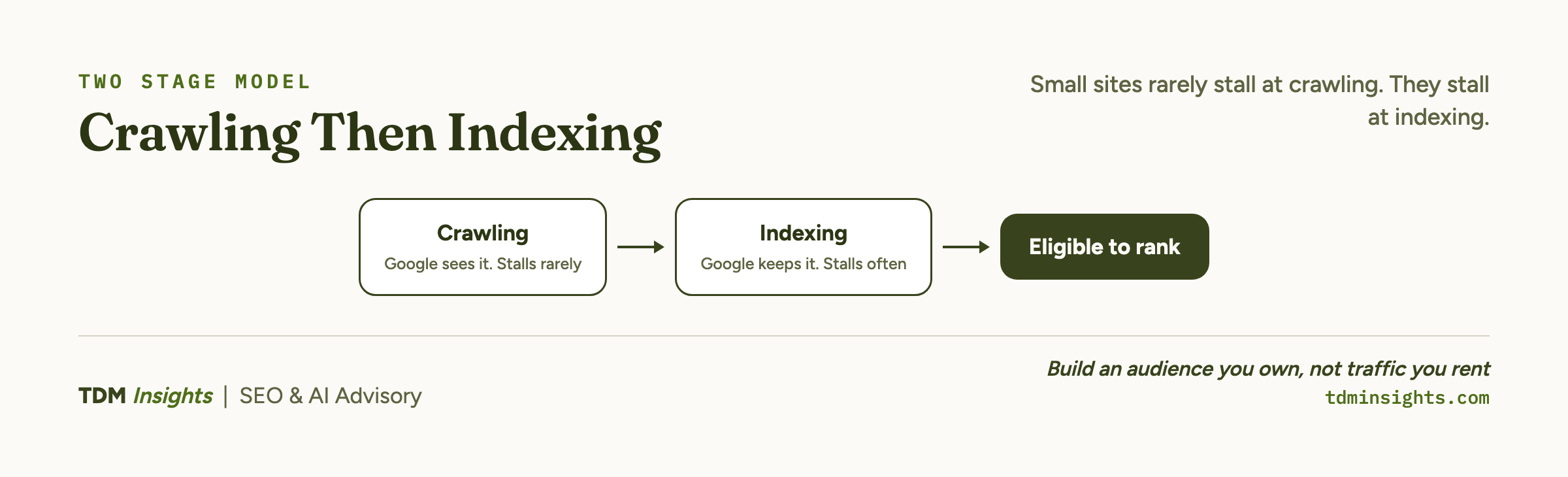
Two stages must both happen before a page can rank. They are separate, and pages stall at different ones.
The distinction is the whole point. A page can be crawled but not indexed, which is Google saying “I read it and chose not to keep it.” A page can also be undiscovered, which is Google saying “I never found it.”
Both leave the page out of search, but they need opposite fixes: one is a content-quality problem, the other is a discoverability problem.
Lumar’s reference on what crawl budget actually is lays out crawl rate versus crawl demand cleanly if you want the underlying mechanics. For a founder, the practical move is to find out which stage your missing pages are stuck at, then fix that stage.
What crawl budget actually is, and the one way a small site leaks it
Crawl budget becomes a genuine constraint when a site is large enough that Google cannot, or will not, crawl every URL frequently. That threshold is high, roughly past the tens of thousands of URLs. The expert-sourced practitioner view in Sitebulb’s guide to how to optimize your crawl budget is consistent on this: it is a big-site discipline.
The one exception is a small site that manufactures URLs it never meant to publish. There are three cases worth ruling out. The first is faceted navigation: filter and sort combinations (color, size, price) that each generate a unique URL, multiplying a 50-product store into thousands of crawlable variants.
The second is parameter URLs: tracking parameters, session IDs, or sort orders that create many URLs for the same content. The third is a large product catalog with filtering enabled, which can generate more URLs than the underlying product count suggests.
This junk-URL problem shows up mainly on commerce and large-catalog setups: Shopify collection filters and WordPress or WooCommerce stores with faceted navigation or parameter URLs. Across the four major platforms compared, smaller Wix and Squarespace sites rarely hit it.
In these cases, the fix is to stop Google from wasting crawl on junk. Use canonical tags to point variants at the main URL, and consider robots.txt rules for parameters that add no unique value. Lumar’s guide on crawl budget optimization, tips and examples covers these tactics.
But confirm you actually have the problem first. If your URL count is in line with your real page count, you do not, and pruning URLs Google was never struggling to crawl is wasted effort.
Why some pages are indexed and others not, and how to confirm it
When a small site has some pages indexed and others missing, the answer is almost always indexing-stage exclusion, and Google will tell you the reason if you ask.
Open the Page Indexing report in Google Search Console. It lists every URL Google knows about, sorted by status, with the exact exclusion reason for each missing one. The two reasons founders see most:
- “Crawled, currently not indexed.” Google fetched the page but chose not to index it, usually judging the content thin, duplicative, or not valuable enough yet. The fix is rarely technical: strengthen the page’s depth and uniqueness, add internal links from related pages, and confirm it is not a near-duplicate, then request indexing again.
- “Discovered, currently not indexed.” Google knows the URL exists but has not crawled it yet, often because it sees low priority. Improve internal linking to the page, make sure it is in your sitemap, and reduce low-value URLs competing for attention.
Both reasons point back to value and discoverability, not crawl budget. The single biggest lever for the discoverability side is structure: a page with no internal links pointing to it is a page Google has little reason to crawl or keep. Building your pages as a connected cluster rather than scattered posts solves this by design, which is the argument in how topic clusters and pillar pages work.
To settle whether a missing page is a crawl problem or an index problem, run one comparison. Open the Crawl Stats report under Settings, which shows total crawl requests over time by response, file type, and purpose.
For most small sites the number of crawl requests comfortably exceeds your page count, which confirms crawl budget is not the bottleneck. If Crawl Stats shows healthy crawling but pages are still missing from the Page Indexing report, your problem is indexing, not crawling. That single comparison ends most of the confusion.
Book a free diagnosis
The hardest part of indexation is telling whether a missing page was crawled and rejected, or never found at all, because the fixes are opposite. A free diagnosis maps exactly where each of your pages stalls in the two-stage model, reads your Page Indexing report with you, and tells you which fix actually applies. No pitch, just the diagnosis, on your real site.
The small-site checklist: sitemap, internal links, discoverability
For a small site, three things do almost all the work of getting pages found and kept:
- An XML sitemap, submitted in Search Console. This hands Google a complete map of the pages you want indexed. It is generated automatically on most website platforms; confirm it exists and is submitted.
- Internal links to every important page. Every page worth indexing should be reachable by clicking links from your homepage. Orphan pages (pages nothing links to) are the most common discoverability failure.
- Genuine value on each page. Thin or near-duplicate pages get the “Crawled, currently not indexed” verdict. Each page should answer something a real visitor wants, which is easier when each page targets keyword demand you can realistically win rather than a term you will never rank for.
That is the list. Notice none of it is crawl-budget optimization. It is indexation hygiene, which is the actual small-site problem.
Technical SEO, fixed by severity places indexation as the Critical tier, the precondition everything else compounds on. A thin page also fails the “value” test that decides indexing, so writing pages that genuinely earn their place is half the battle, which is the focus of content that ranks and gets cited by AI.
Resolving indexation also sets a realistic clock on results, since a page only starts its climb to rankings on the usual SEO timeline once it is actually indexed. Once indexation is confirmed clean, the next layer up is the Medium-tier rich-results work covered in structured data, the 80/20.
Indexation sits at the top of the severity-ranked technical checklist, the at-a-glance view of this whole topic. Indexable, well-linked pages are also what shapes how AI answer engines choose their sources, and once those engines start sending readers, measuring AI traffic with no referrer is how you see it.
Frequently Asked Questions
What is crawl budget and do small sites need to worry about it?
Crawl budget is how many pages Google will crawl on your site in a given period. For sites under a few thousand pages, it is almost never a real constraint, because Google crawls small sites comfortably. Google itself says crawl budget matters mainly for very large sites. Your real concern is indexation, not crawl budget.
What’s the difference between crawling and indexing?
Crawling is Google fetching and reading a page. Indexing is Google deciding to store that page and make it eligible to appear in results. A page can be crawled but not indexed if Google judges it thin, duplicate, or low value. Both must happen to rank, and small sites usually stall at indexing, not crawling.
Why are some of my pages indexed and others not?
Google indexes pages it considers valuable and discoverable. Pages can be excluded for being thin or duplicate, lacking internal links, carrying a noindex tag, or canonicalizing to another URL. Open the Page Indexing report in Search Console: it lists each excluded URL with the exact reason, which tells you what to fix.
What does “Crawled, currently not indexed” mean?
It means Google fetched the page but chose not to index it, usually because it judged the content thin, duplicative, or not valuable enough yet. The fix is rarely technical: strengthen the page’s depth and uniqueness, add internal links from related pages, and confirm it is not a near-duplicate of another URL, then request indexing again.
What does “Discovered, currently not indexed” mean?
It means Google knows the URL exists but has not crawled it yet, often because Google is rationing crawl to your site or sees low priority. Improve internal linking to the page, make sure it is in your sitemap, and reduce low-value URLs competing for crawl. It usually resolves once the page looks worth indexing.
How many pages does Google crawl on my site?
Check the Crawl Stats report in Google Search Console, which shows total crawl requests over time, by response, file type, and purpose. For most small sites the number comfortably exceeds your page count, confirming crawl budget is not the bottleneck. If crawling looks healthy but pages are missing, the problem is indexation.
Continue Reading:
More On Technical SEO for Founders
- Technical SEO for Founders: What to Fix First
- Core Web Vitals Explained for Non-Engineers
- Why Isn’t My Site Indexed? A Founder’s Diagnostic
- Site Speed: The Fixes That Actually Move Rankings
- Structured Data for SEO: The Founder’s 80/20
- WordPress vs Shopify vs Wix vs Squarespace, Compared
- SEO and AI Visibility Tracking Tools, Compared
More from TDM Insights
- Content Strategy for Founders: A Library That Ranks, Gets Cited, and Pays for Itself
- How AI Answer Engines Choose Their Sources
- How to Measure AI Traffic With No Referrer
- Topic Clusters and Pillar Pages: How They Work
- Content That Ranks and Gets Cited by AI
Explore TDM Insights Categories