
Structured Data for SEO: The Founder’s 80/20
Five schema types earn the rich results, the rest is noise. What structured data does, what it can't do, and how to add it.
 By David Jubé · May 5, 2026 · 11 min read

Structured data does not make you rank higher. It makes you eligible for the richer-looking results (the star ratings, the FAQ accordions, the breadcrumb trails) and it makes your content easier for both Google and AI answer engines to extract.
That is a real click-through win, but a Medium-tier one in technical SEO, fixed by severity. It also will not shortcut the timeline SEO genuinely takes to pay off, since a rich result only helps a page already earning impressions.
This article gives you the 80/20: which five types are worth your time, what schema genuinely does not do, the line between Google rich results and AI citation, and how to add and test it across the major platforms.
Key takeaways
- Structured data does not raise rankings; it makes pages eligible for rich results like star ratings, FAQ accordions, and breadcrumb trails, and makes content easier for Google and AI engines to extract.
- Add just five to six schema types in JSON-LD format: Organization, LocalBusiness, Product or Service, FAQPage, Article or BlogPosting, and BreadcrumbList, then confirm they validate and stop.
- Schema only earns its keep on indexed pages that already rank, so if your pages are not ranking, fix content, indexation, and relevance first, because markup on an unindexed page does nothing.
- The same markup serves two jobs, Google rich results and AI citation, and the common founder mistake is duplicate markup from stacked apps, so let only one source emit each type.
The answer: schema earns rich results and citations, not rankings
Schema does two things, both valuable. It makes you eligible for rich results: the enhanced search listings with stars, prices, FAQ dropdowns, and breadcrumbs that take up more space and earn more clicks. Eligibility is not a guarantee Google will show them, but you cannot get them without the markup.
It also makes your content more extractable, which matters as AI answer engines decide what to quote. The same labeled structure that helps Google build a rich result helps a model identify a clean, citable answer.
The prerequisite is simple: indexation comes first (crawl budget on a small site covers that), because schema on an unindexed page does nothing at all. Schema only earns its keep on pages that deserve to be found, which is why it pairs with content that ranks and gets cited by AI.
What structured data is (and why JSON-LD)
Structured data is a standardized vocabulary, defined at Schema.org, for describing the things on a web page in a way machines understand. Instead of leaving Google to guess that “$49” is a price and “4.8 stars” is a rating, you label them explicitly.
There are three formats for adding it, but only one matters for a founder: JSON-LD. Google recommends JSON-LD because it sits in a single block in the page’s code, separate from the visible content, which makes it easy to add, edit, and validate without touching your layout. The two older formats (Microdata and RDFa) interleave with your HTML and are harder to maintain.
The practical implication: you do not need to restructure your page to add schema. You add a JSON-LD block that describes what is already there. Yoast’s structured data ultimate guide is a clear plain-language explainer if you want the concept in more depth before you implement.
The Schema 80/20: the five types worth your time
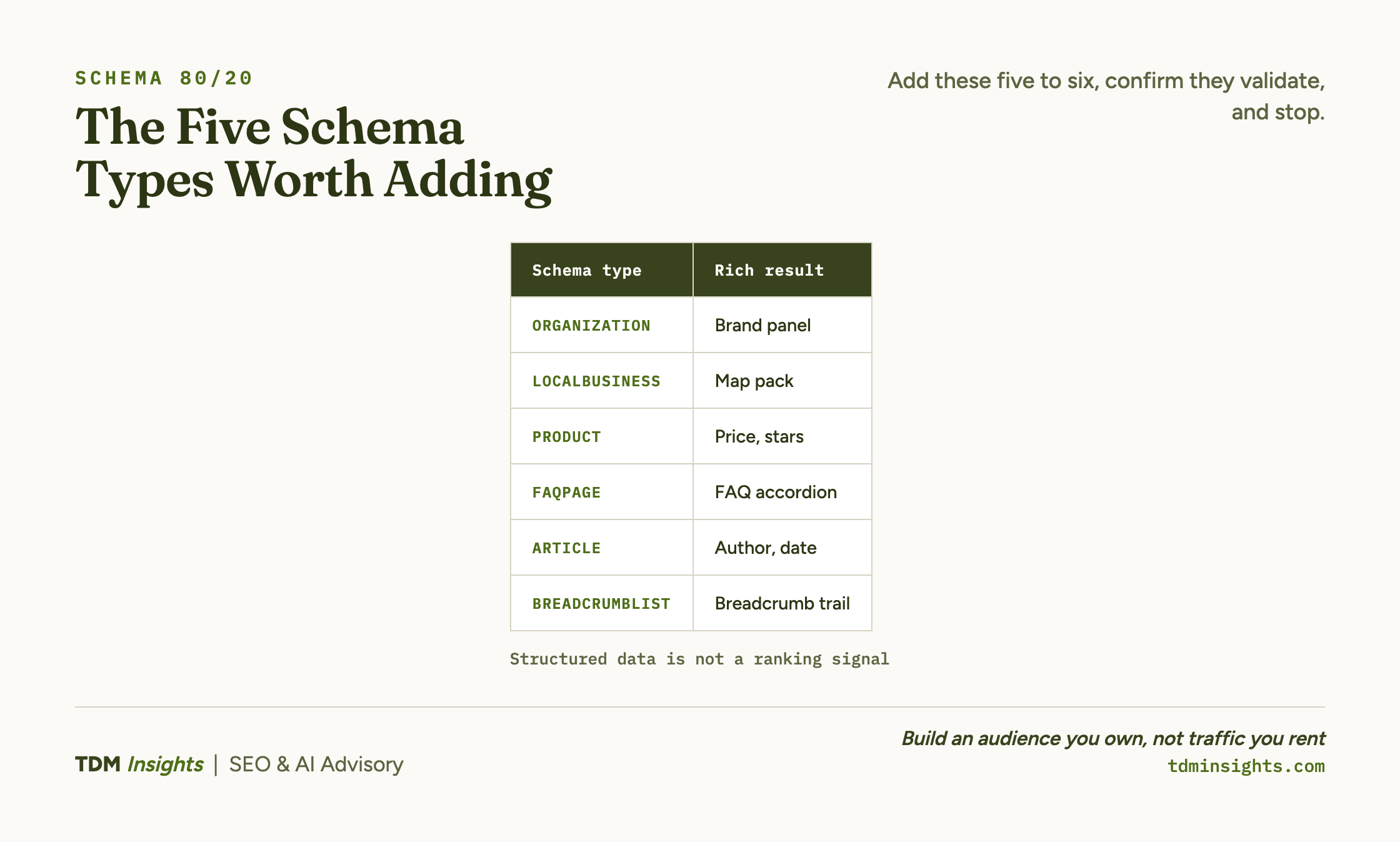
For most small businesses, five schema types earn nearly all the value. Add these, confirm they validate, and stop.
The discipline is restraint. There are hundreds of schema types at schema.org, and adding obscure ones past these five rarely returns anything.
The two commerce types most founders need are documented directly at schema.org: Product schema for stores and LocalBusiness schema for anyone serving a local area. For the definitive list of which markup actually earns a result, Google’s Search Central documentation catalogs every supported feature.
What schema does not do (the ranking myth, corrected)
The single most common misconception is that adding schema raises rankings. It does not, and believing it does leads founders to rabbit-hole on markup while ignoring the things that actually move position.
Schema is not a ranking signal. Google has stated this directly.
A page with perfect structured data and weak content still ranks where its content earns. The benefit is entirely downstream, in the rich-result eligibility and extractability covered above.
That distinction changes how you should spend time. If your pages are not ranking, schema is not the fix; content, indexation, and relevance are. If your pages rank but get few clicks, a rich result might genuinely help, and schema is worth adding.
Spending time well here is the same judgment behind deciding whether SEO is worth investing in for your startup at all: put hours where they move position, not where they feel productive. Yoast’s practical walkthrough of implementing schema in WordPress is a useful reference for the implementation side once you have decided it is worth doing, and Lumar’s piece on using structured data to drive organic traffic frames the click-through case honestly.
Book a free diagnosis
Schema is the easiest technical layer to over-invest in and the easiest to get subtly wrong, with duplicate markup from stacked apps being the most common founder mistake. A free diagnosis checks whether your structured data validates, whether it is earning rich results, and whether it is even your highest-leverage fix right now. No pitch, just a straight read on what your markup is actually doing.
Rich results for Google versus citation for AI: same markup, two jobs
The same markup serves two outcomes, and the distinction is in what you optimize for. For the rich-results job you are optimizing for Google’s traditional listing. For the citation job you are optimizing to be the source a model quotes when an engine like ChatGPT, Perplexity, or Google’s AI Overviews builds an answer.
This article handles the rich-results side. The citation side is answer engine optimization (AEO), a separate discipline with its own playbook.
If the alphabet soup of disciplines here is new, what GEO, SEO, AEO, and LLMO actually mean maps the terms first. The writing-and-schema pairing that feeds answer engines is covered in answer-first writing and schema for AI, and the practical moves to earn those citations are in how to get cited by ChatGPT, Perplexity, and AI. Read those when you want the AEO side.
How to add schema on the major platforms
Each platform handles structured data differently, and knowing the defaults saves you from creating conflicts. The table below covers the four most common setups; for the wider feature trade-offs between them, see WordPress, Shopify, Wix, and Squarespace compared.
Whichever platform you use, the rule is the same: confirm what it already provides before adding anything, and never let two sources emit the same type. The severity-aware view that lists schema alongside every other technical item is the severity-ranked technical checklist. Schema also rewards pages that are connected rather than scattered, so it pairs naturally with how topic clusters and pillar pages work.
How to test it
Never assume your schema works; test it. There are two tools, for two jobs.
For a single page, use Google’s Rich Results Test. Paste a live URL or your JSON-LD code, and it tells you which rich results the page is eligible for and flags any errors or warnings.
Run this every time you add or change markup, and fix errors before moving on. Warnings are usually optional fields you can ignore.
For site-wide monitoring, open the rich result status reports in Google Search Console, documented at Google’s guide to the rich result status report. These show valid, warning, and invalid items by type across all your indexed pages, so you catch a markup error that repeats across the whole site at once.
The workflow: add schema, test the single page with the Rich Results Test, then watch the Search Console reports over the following weeks to confirm it stays valid at scale. Whether the markup is actually earning citations is a separate question that the SEO and AI visibility tracking tools are built to answer. That closes the loop on the whole technical triage.
You have now seen indexation first, then Core Web Vitals and speed, then structured data, in severity order, which is the only order that protects a founder’s limited time. That same severity-first discipline carries into the wider plan of what to publish and why, which is the subject of a content strategy that builds a library that ranks and gets cited, and puts the whole technical layer in context.
Frequently Asked Questions
Does schema markup improve Google rankings?
Not directly. Structured data is not a ranking factor on its own. What it does is make you eligible for rich results like star ratings, FAQ accordions, and breadcrumbs, which lift click-through, and it makes your content easier for Google and AI engines to extract and cite. The clicks help; the markup itself does not move position.
What is schema markup in plain terms?
Schema markup is code, usually JSON-LD, that labels what your content means so search engines understand it: this is a product, this is its price, this is a review. Humans read the page; schema tells the machine what each part is. That clarity is what makes a page eligible for enhanced, richer-looking search results.
Which schema types are actually worth adding?
For most small businesses, five types earn nearly all the value: Organization (or LocalBusiness for local), Product or Service, FAQPage, BreadcrumbList, and Article or BlogPosting. These map to rich results Google actually shows. Adding obscure types past these is rarely worth the time. Start with the five, confirm they validate, then stop.
How do I add schema markup on Shopify?
Shopify themes typically include basic Product and Organization schema by default. To add or extend it, use a dedicated schema app or edit the theme’s JSON-LD template, then validate with Google’s Rich Results Test. Avoid stacking multiple apps that inject duplicate markup, which creates conflicts Google may ignore or flag.
How do I add structured data on Wix?
Wix automatically generates schema for standard page types, and its SEO settings let you add custom structured data per page through the advanced SEO panel. For anything beyond the defaults, paste validated JSON-LD into the custom markup field. Always run the page through Google’s Rich Results Test afterward to confirm the markup is eligible.
How do I check if my schema markup is working?
Use Google’s Rich Results Test on a live URL or pasted code to see which rich results the page is eligible for and to catch errors. For site-wide monitoring, open the rich result status reports in Google Search Console, which show valid, warning, and invalid items by type across all your indexed pages.
Continue Reading:
More On Technical SEO for Founders
- Technical SEO for Founders: What to Fix First
- Core Web Vitals Explained for Non-Engineers
- Why Isn’t My Site Indexed? A Founder’s Diagnostic
- Crawl Budget and Indexation for Small Sites
- Site Speed: The Fixes That Actually Move Rankings
- WordPress vs Shopify vs Wix vs Squarespace, Compared
- SEO and AI Visibility Tracking Tools, Compared
More from TDM Insights
- Content Strategy for Founders: A Library That Ranks, Gets Cited, and Pays for Itself
- Topic Clusters and Pillar Pages: How They Work
- Schema Markup for AI: Answer-First Writing Guide
- How to Get Cited by ChatGPT, Perplexity, and AI
- Content That Ranks and Gets Cited by AI
Explore TDM Insights Categories