
Site Structure for a New Website: The Two Numbers
Your new site already has a structure that nobody chose. Here is how depth, categories and navigation should work, plus a check to run.
 By David Jubé · Aug 31, 2026 · 13 min read

Your new site shipped with a hierarchy, a menu and a category list that nobody decided, and search engines are already reading all three as a claim about your business.
A template made those choices. It shipped a menu with every page in it, a flat set of URLs generated from page titles, and a category list inherited from a demo import describing somebody else’s imaginary company. None of that was wrong at the time, because a build tool has to render something and a default renders faster than a question gets asked. The cost arrives later, when that shape starts deciding which of your pages get found, which get crawled often, and which sit four clicks deep where nobody arrives.
Key takeaways
- Click depth carries the claim: one click from home declares a page important, four clicks in declares it minor.
- A templated build gets navigation wrong in four places: a flat menu, demo categories, accidental depth, and labels that name the site rather than the business.
- A category earns its place only if it holds enough posts, names a group people search for, and has an archive worth reading.
- The check returns your deepest important page and your emptiest category, and every gap it exposes is a page to write, move or rewrite.
A structure nobody chose is still a structure
Every website stacks three things: the pages, the design that renders them, and the shape that connects them. Structure is the third one, and it is the only one that arrives without announcing itself. It is which page sits above which, how far each sits from the home page, and what your navigation calls important enough to name.
A crawler has no way of knowing the shape was a default. It reconstructs your hierarchy from the trail of links and breadcrumbs your build emitted, and what a crawler reads when it reconstructs a site’s hierarchy is that trail and nothing beyond it. Whatever the template decided, an engine treats as your considered opinion about your own business.
Position 2 of this journey, AI Built WordPress Themes: Four Decisions You Own, names four decisions a build tool makes when nobody makes them deliberately. Your structure is the first of them, shipped and already being read. Heading order and on-page answers sit one level below it, in How to Structure a Page to Rank and Get Cited.
The measurable part of the shape is distance.
Depth is a ranking of importance, and yours was set by a widget
Click depth is the number of clicks from the home page to a page by the shortest route, and it is the cheapest structural number you can measure. A page further out is reached through more steps, so fewer readers arrive and fewer crawl paths lead there. NN/g’s usability research on the depth versus breadth trade-off covers the human half of that, and the HTTP Archive’s chapter on site structure and crawl depth across the web covers the measurable half.
Your menu is where the number gets set, because navigation links repeat on every page and outnumber everything else pointing inward. Zyppy’s study of 23 million internal links across 1,800 sites puts that scale in view. A page in the main menu is one click from home on every route into the site, while a page left out of it depends on whatever links happen to exist elsewhere.
Your URLs carry the same hierarchy in readable form, generated from page and post titles with nobody reviewing the result. Reporting on URL structure best practice is worth reading before you accept what your build produced, because an address becomes awkward to change once search engines have indexed it.
Depth weighs heavier on a new site than an established one. With no link history behind you, your hierarchy is close to the only evidence an engine has about which of your pages matter, which is the cold start problem approached from the structural side. Position 14 of this journey, SEO for AI Search When Nothing Else Mentions You Yet, approaches it from the other.
What a templated build gets wrong about navigation, in four places
Four defaults account for the navigation problems that turn up on a newly built site.
- Everything is in the menu. A demo import ships a flat menu with every page in it, because flat is the safe answer when nothing knows which pages matter. A menu ranks importance; a flat one ranks nothing.
- The categories came from the demo. Inherited categories describe the template’s imaginary business. They are generic, hold few posts worth grouping, and generate archives that compete with the posts inside them.
- Depth is accidental. The distance from home to a service page was set by a menu widget, so some pages land one click deep and some land four with no logic connecting the two.
- The navigation describes the site, not the business. A generated menu labels things the way a content system thinks about them, Blog and Pages and Portfolio, rather than the way a buyer asks for them.
Those labels are anchor text on every page they appear on, so a menu item reading Blog spends a link on describing a content type instead of a service. Conductor’s study of anchor text across 280,000 links is a fair warning about how hard the words inside a link work. Rewriting them is the same job as making your business legible as a thing rather than a website, which is Entity SEO: How to Become a Known Thing to AI.
The second default on that list costs more than the labels do, because a category is not only a label.
A category earns its page or it competes with your pages
In WordPress and in systems built the same way, creating a taxonomy creates pages. An archive is generated for every category and every tag, whether or not anyone writes a word on it, and Yoast’s reference on how taxonomies shape a site’s structure sets out what those archives do to the shape once they exist. Each one is a live page carrying your domain name, crawlable and rankable, so each should be a page you would defend in front of a stranger.
A category earns that place when three things are true.
- It holds enough published posts that grouping them tells a reader something no single post could.
- Someone would search for the group rather than one member. If you cannot picture that query, Free Keyword Research: A Starter Method, No Tools will tell you.
- Its archive says something the member posts do not, meaning an introduction a person wrote rather than an automatic list.
A category failing all three is a thin page competing with the content you want found, so merge it into one that passes, or delete it and keep the posts.
The upgrade from a flat list is a hub, a page that introduces a group and links into it, written by a person rather than generated from a loop. What a hub and spoke structure looks like in practice is the shape to compare yours against. Nesting is the other lever available, and it adds a click to everything underneath, so create a subcategory only once a parent has grown too large to scan.
In practice
The structure that causes trouble is rarely the wrong one. It is the one nobody has looked at, because a shape that was never a decision never gets reviewed.
The twenty-minute check: your sitemap, two columns, and a count
Open your sitemap, usually at /sitemap.xml or wherever your SEO plugin publishes one. The sitemap protocol’s own specification describes it as a readable inventory of what your site publishes, which is what makes it the right list to start from. You need a spreadsheet and nothing else.
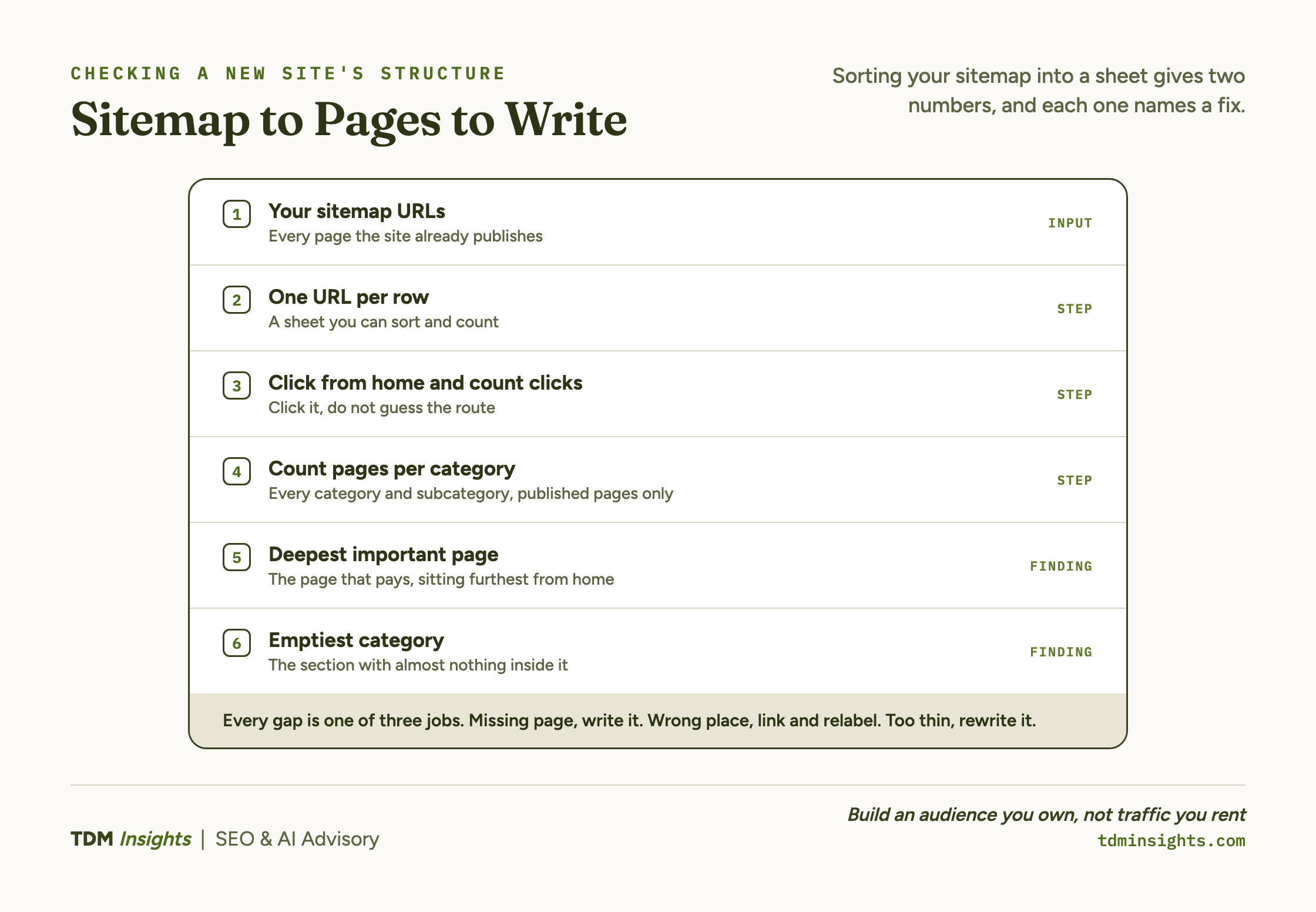
- Paste every URL from the sitemap into a spreadsheet, one per row. This is the list of pages and posts you have, which is often not the list you thought you had.
- Click your way to each URL from the home page and record how many clicks the shortest route took. In a second column, note whether the page is in your main menu.
- List every category and subcategory and count the published posts inside each. Mark the empty and near-empty ones.
Click rather than guess on step two, because the route you assume exists and the route that exists differ often enough to be the point of the exercise. A page you reach in two clicks from memory can take four from a cold start, and the crawler is always starting cold. Breadcrumbs, if your build emits them, shorten the work by publishing the hierarchy on the page itself.
Two numbers come out, and each one names a decision
The first is your deepest important page: of the pages that make you money or make your case, the one sitting furthest from home. That distance is the gap between what you believe about the page and what your site says about it, and closing it is usually a home page link or a menu change rather than a rebuild.
The second is your emptiest category. Open its archive and read it the way a stranger arriving from a search result would, with no idea what the site is for. If that page would embarrass you, it is embarrassing you already, on a URL carrying your domain name.
What each fix asks of you depends on where your content is stored. Moving a page in a menu is a menu edit, while moving a page a design tool holds inside its own format is a different job, and that difference is position 4 of this journey, Rebuild or Redesign: One Staging Test Tells You Which.
Book a free diagnosis
You have a method and two numbers. The harder part is judging which gap to close first. A free diagnosis reads your live structure and hands you the order to close them in.
Every gap in the structure is a page waiting to be written
Both numbers resolve into writing work, and every gap the check exposes turns out to be one of three jobs.
- A page that should exist and does not. Usually a service page a buyer searches for by name, or a hub for a group that currently has only an automatic archive.
- A page that exists in the wrong place. The fix is a link and a menu label rather than new copy, which makes it the fastest win on the list.
- A page that does not say enough to hold its position. That is a rewrite against the query it should answer.
Putting those in an order is the next step. Position 5 of this journey, Website Content Writing for SEO: The Four Rung Ladder, sequences them, because structure decides which pages you need before anyone decides which to write first. How the links between them get built is Internal Linking: The Most Underrated SEO Lever, and how the finished set carries a reader toward a decision is How to Build a Content Funnel (TOFU to BOFU).
Structure is the third thing your build handed you, and the only one that is cheap to change now and expensive to keep ignoring.
Frequently Asked Questions
What is site structure?
Site structure is the shape of your website: which pages sit above which, how far each page is from the home page, and how your navigation and categories group them. It already exists on any live site, chosen by your build if not by you, and two numbers measure it: click depth and posts per category.
What are the four types of website structure?
The four commonly named types are hierarchical, sequential, matrix and database. Naming yours matters less than knowing what your depth costs. A hierarchical shape is what a template usually ships, and the question worth asking is how many clicks separate your home page from the page that earns your money.
Is it better to have a one page website or multiple pages?
Multiple pages, if each page earns its place. A page earns it by answering a question someone searches for and by saying something the other pages do not. One page competes for one primary intent, so a business with three distinct offers is asking a single page to do three separate jobs at once.
What’s the difference between categories and tags in WordPress?
Categories are hierarchical and can nest; tags are flat. The difference that changes anything is that both generate an archive page automatically, so both add pages to your site whether or not you write them. Judge each one by whether its archive earns a place in search results, not by the label.
What is the difference between categories and subcategories?
A subcategory is a category nested inside another one, which adds a click between your home page and everything below it. Nest only when a parent has grown too large to scan, and apply the same test to the child: enough posts, a group someone would search for, and an archive worth reading.
Are breadcrumbs needed for SEO?
Breadcrumbs are useful rather than required. Their real value is diagnostic: a breadcrumb trail publishes your hierarchy on the page itself, so it shows you and a crawler the same path. If your breadcrumbs read oddly, the hierarchy behind them reads oddly too, and that is the thing to fix.
Continue Reading:
Previously in this series
- AI Built WordPress Themes: Four Decisions You Own, the four decisions a generated theme hands back, one of which is the content model this structure rests on.
Next in this series
- Rebuild or Redesign: One Staging Test Tells You Which, what changing direction costs once that structure is live, and the staging test that prices it.
From the library
- Topic Clusters and Pillar Pages: How They Work, building that architecture only makes sense once a category has earned its own page.
- Search Intent: The Four Types That Decide Everything, matching intent decides which categories deserve that shallow slot in the first place.
- Crawl Budget and Indexation for Small Sites, why the pages a fixed structure surfaces still have to get indexed.
- Technical SEO for Founders: What to Fix First, where a navigation fix like this sits against the rest of your technical list.
Explore TDM Insights Categories