
Title Tags and Meta Descriptions That Get Clicks
Google rewrites weak titles anyway. The right length, why it happens, and how to win the click from wherever you rank.
 By David Jubé · Jun 17, 2026 · 11 min read

The first organic result on a Google page earns somewhere around 28 to 40 percent of the clicks, and the rate falls steeply with every position below it. So here is the lever that hides in plain sight: a sharper snippet at position four can out-earn a weak one at position two.
You do not always have the higher rank yet. You can write the better snippet today.
The title tag and meta description are the only part of your page a searcher ever sees before they decide. Together they are one promise, and the promise is what wins the click-through rate (CTR) your ranking has already earned you. A page that ranks but is not clicked earns nothing.
This article covers the lengths that survive truncation, why Google rewrites titles and how to make one it keeps, what click-through rate by position actually looks like, and a checklist for writing the promise. Plain answer first: title and meta are one promise, written for the result it sits next to, within the limits Google will keep.
Key takeaways
- Your title tag and meta description are one promise, written for the result they sit next to, and a sharper snippet at position four can out-earn a weak one at position two.
- Treat the snippet as a competition, not a spec. The character count is the floor, the real work is making the case that your page answers this exact query better than the results above and below it.
- Keep titles to roughly 50 to 60 characters, about 575 pixels, and front-load the keyword, because the end of a title is what Google truncates. Lead the meta with the promise inside the first 120 characters.
- Google rewrites your title when it is too long, keyword-stuffed, duplicated, or a weak query match, often pulling from your H1. Write it concise, unique, descriptive, and aligned to the query to keep the one you wrote.
- The top organic result earns roughly 28 to 40 percent of clicks and the rate falls steeply below it, so writing a snippet that pulls above its position is the fastest, highest-return change on a page that already ranks.
The click is a competition, not a spec
A spec gives you a character count. A competition asks a harder question: out of the ten results on this page, why would the searcher pick yours?
Many guides stop at the spec. They hand you “keep titles under 60 characters” and call it done.
That number matters, but it is the floor, not the work. The work is the promise: your title and meta have to say, in the few words that fit, that your page answers this exact query more specifically and more usefully than the result above and below it.
That reframe changes how you write. You are not describing your page. You are making a case for the click against named competition you can see by searching your own keyword.
Read the search results first, then write to beat the snippets already there. Backlinko’s breakdown of title-tag formulas that earn clicks is a useful starting point for the patterns that tend to win.
How long should a title tag be?
Two limits decide whether your snippet shows in full or gets cut:
- Title tag: roughly 50 to 60 characters, though the real constraint is pixel width, about 575 pixels, not the character count. A title full of wide letters can get cut before it hits 60. Google truncates anything longer with an ellipsis, and the end of your title is what disappears.
- Meta description: about 120 to 155 characters, so Google shows the full line on common screen sizes. There is no hard limit, but past roughly 155 characters Google tends to trim or rewrite.
So front-load the title. Put the primary keyword and your most compelling words first, where they survive truncation and where the eye lands. Zyppy’s large-scale study of title-tag length and rewrites is the clearest data on where the cutoff actually falls, and Moz‘s reference on title-tag length and keyword placement is a solid baseline if you want the canonical rules in one place.
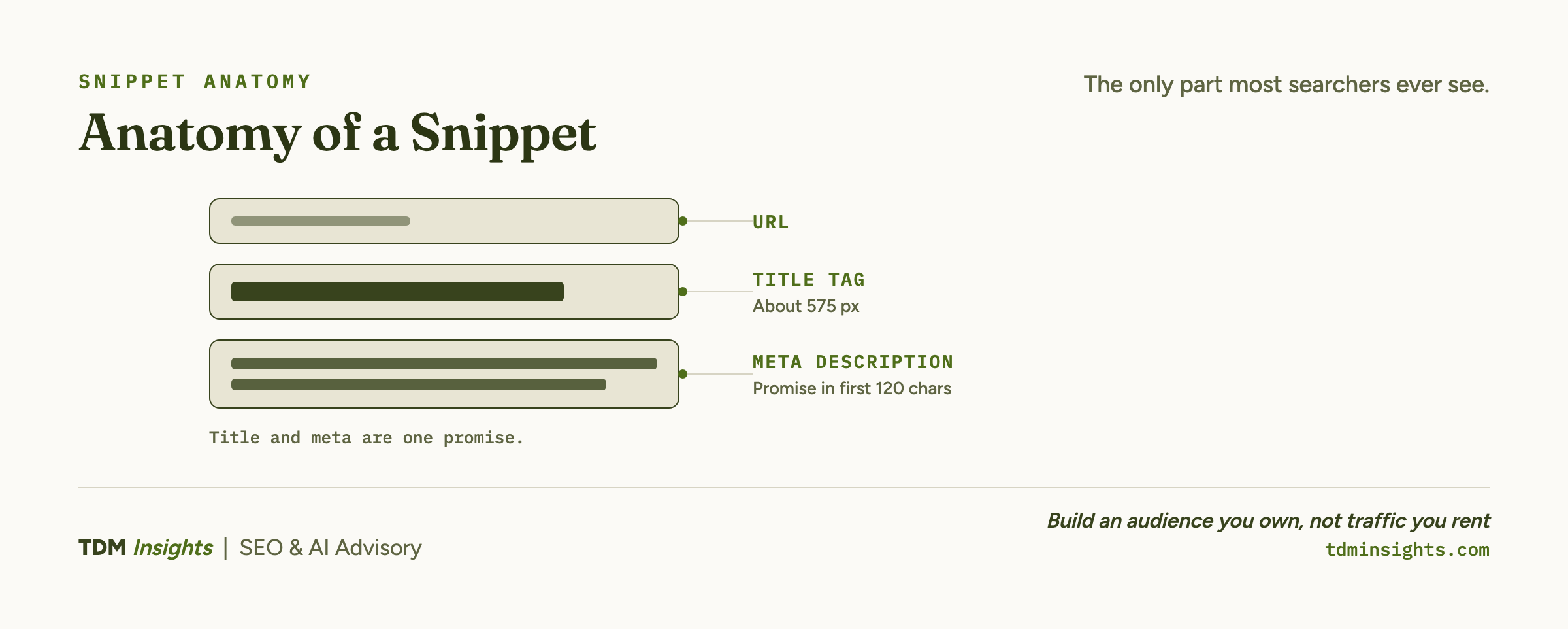
For the meta, mobile results truncate earlier than desktop, so lead with the key promise and treat everything after the first 120 characters as a bonus that may not render. Put the value up front. Google’s own guidance on how snippets are generated confirms it will build the description from your page when yours does not fit the query.
Why does Google rewrite my title?
Google rewrites your title when it judges the one you wrote a poor fit for the result, and it does this often. The honest answer founders rarely get: it is not a bug, and you cannot fully prevent it, but you can make it rare.
Google overrides your title when it trips one of a few triggers:
- Too long. It runs past the pixel limit and gets cut.
- Keyword-stuffed. The same term repeats until it reads like spam.
- Duplicated. Several of your pages carry the same title.
- Weak match. It does not line up with the actual query.
When it overrides you, it usually pulls a better line from your H1 or your on-page text, which means a sloppy H1 can become your snippet whether you like it or not. Google’s own documentation on how it generates title links lays out the triggers plainly, and Bruce Clay’s explainer on why Google changes your title in search results adds practical fixes for each trigger.
To keep the title you wrote, make it concise, unique to that page, descriptive of what the page delivers, and clearly aligned with the query. A title that already reads like the best possible answer to the search gives Google no reason to swap it.
Write the H1 well too, since that is the line Google reaches for when it does override you. Scalenut’s current pixel-and-character guidance for titles works as an SEO title checker for sanity-checking width before you publish.
Book a free diagnosis
Pages ranking on page one but quiet on clicks usually have a snippet problem, not a ranking problem, and it is the cheapest fix in search. We run a free diagnosis on your live site: we pull the queries where you rank but get skipped, compare your titles and metas against the snippets actually winning those clicks, and show you the rewrites. No deck, no retainer pitch, just a straight read on where the clicks are leaking.
What click-through rate by position really looks like
Rank and clicks are not the same prize. Ranking gets you onto the page. The snippet, and the position, decide what share of the page’s attention you capture.
Here is the shape of it, drawn from maintained click-through studies (figures are directional and shift by query type and the SERP features present):
First Page Sage maintains a running dataset of Google click-through rate by ranking position worth checking against your own numbers.
The consequence for a founder is blunt. Climbing one position is slow and partly outside your control. Writing a snippet that pulls above its position is fast and entirely in your hands.
A well-written result at position four that earns 9 percent instead of its expected 6 is doing the work of a higher rank you have not earned yet. That is why the snippet has to do more work than the rank suggests, and why it is the single highest-return thing you can change on a page that already ranks.
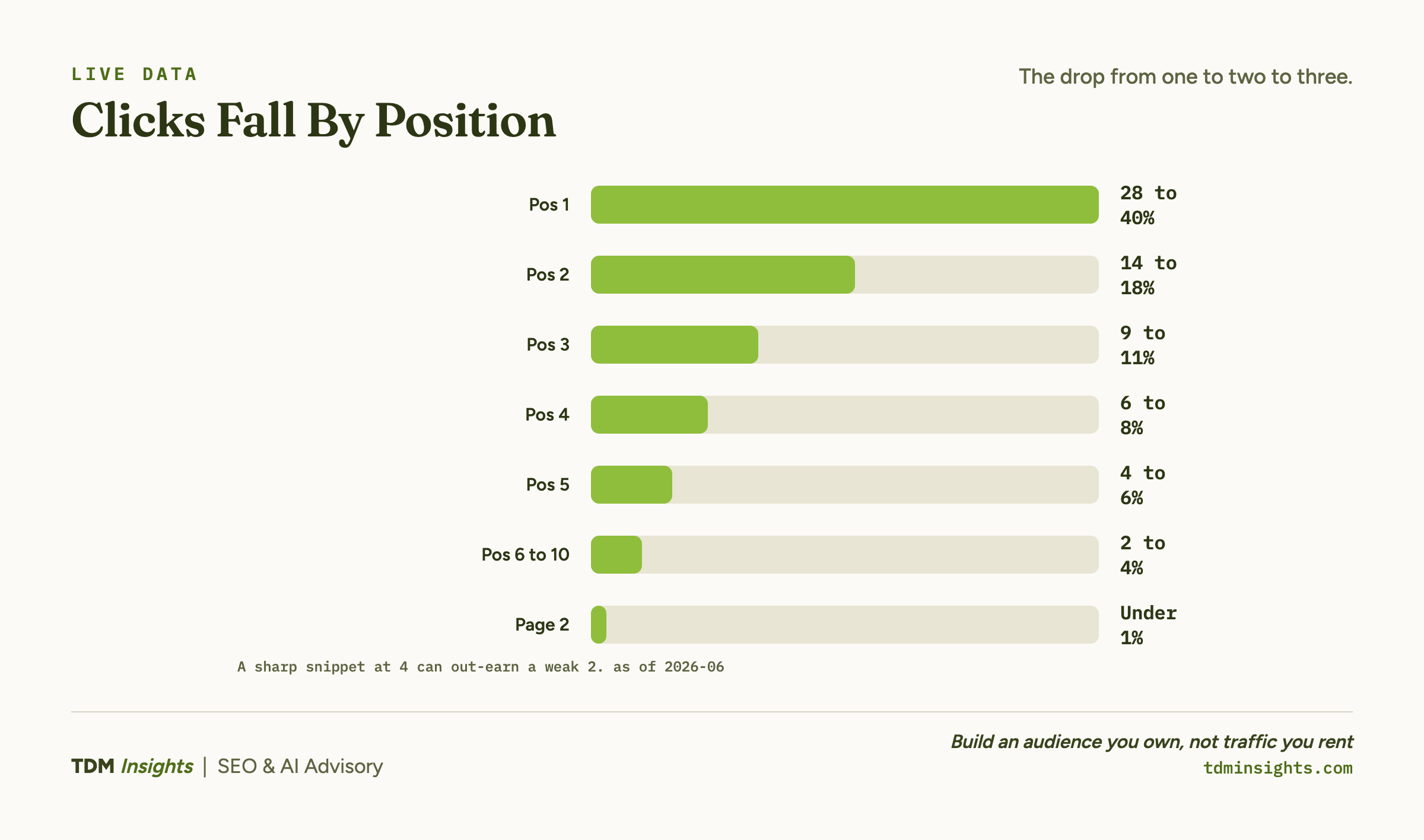
One more thing the table hides. AI Overviews and other result features push the ten blue links down the page, which flattens these numbers further.
That makes the snippet’s job harder and more valuable at once. The way to fight it is to read the result page before you write the snippet, so you know what you are sitting next to.
Writing the promise: a snippet checklist
A snippet that earns the click does five things. Run your title and meta against this list before you publish:
- Names the searcher’s words. Use the phrasing from the query itself. Google bolds matched terms in the result, so the searcher’s own words make your snippet visually jump.
- Promises one specific thing. Not “everything about title tags.” The one outcome the searcher came for. Specific beats comprehensive every time in a snippet.
- Gives a reason to choose you. A number, a year, a freshness signal, a credential, a sharper angle. Something the result above does not say.
- Fits the limits. Title front-loaded inside ~575 pixels. Meta’s promise inside the first 120 characters. Nothing important lives in the part that truncates.
- Reads like a human wrote it for a human. No keyword stuffing, no repeated phrases, no robotic stacking. Stuffed snippets are exactly what Google rewrites.
The common mistakes are the inverse of that list: titles padded with brand name and pipes before the keyword, metas that describe the page’s existence (“On this page we discuss…”) instead of the reader’s payoff, and the same exact-match keyword jammed into title, meta, and H1 until Google overrides all three. Write the meta as a promise to the reader, not a summary to a crawler. OptinMonster’s examples of high-converting meta descriptions are a good model for the verb-led, benefit-first phrasing that pulls clicks, and Yoast‘s guide to writing meta descriptions covers the WordPress-side mechanics if that is your stack.
This snippet work is the second stage of building a page that wins, sitting just after you read intent and just before you wire the page into your site. The snippet you write has to promise the intent your snippet must answer, so the page and the promise match.
For the full sequence, see the page-build model these snippets plug into, then wire the page into your internal link graph. The same answer-first instinct that wins the click also helps write the line answer engines lift.
Frequently Asked Questions
How long should a title tag be?
Keep title tags to roughly 50 to 60 characters, or about 575 pixels, so Google does not truncate them in the results. Front-load the primary keyword and the most compelling words, since the start is what survives truncation. Length is a pixel limit, not a character count, so shorter titles with wide letters can still get cut.
Why does Google rewrite my title tags?
Google rewrites titles when it judges yours too long, keyword-stuffed, duplicated across pages, or a poor match for the query. It often pulls a better fit from your H1 or on-page text. To keep your title, make it concise, unique, descriptive, and clearly aligned with the page content and the searcher’s query.
How long should a meta description be?
Aim for about 120 to 155 characters so Google shows the full description on most devices without cutting it off. Mobile results truncate earlier, so lead with the key promise. The meta description has no fixed limit, but anything past roughly 155 characters risks being trimmed or rewritten, so put the value up front.
Do meta descriptions affect SEO rankings?
Meta descriptions are not a direct ranking factor, but they strongly affect click-through rate, which influences how well a ranking page performs. A sharp, specific description can win the click against pages ranked above you. Google also rewrites descriptions often, pulling text from the page, so write the page itself to support a strong snippet.
How do you write a meta description that gets clicks?
Write it as a promise: state exactly what the searcher gets, use their words from the query, and give one reason to choose you over the results around you. Include the primary keyword naturally, since Google bolds matched terms. Add a light call to action and stay specific. Vague descriptions lose to concrete ones every time.
What is the click-through rate for the first position on Google?
The top organic result earns roughly 28 to 40 percent of clicks in most studies, with click-through rate falling steeply at each lower position. Position two and three drop into the low teens, and page-two results earn very little. This is why a strong snippet at position four can out-earn a weak one at position two.
Continue Reading:
More On On-Page SEO:
- How to Structure a Page to Rank and Get Cited
- Search Intent: The Four Types That Decide Everything
- Internal Linking: The Most Underrated SEO Lever
- How to Read the SERP Before You Write a Word
- Free Keyword Research: A Starter Method, No Tools
More from TDM Insights:
- Keyword Research for Startups: Demand You Can Win
- SEO for Startups: What to Do in the First 90 Days
- How to Show Up in Google AI Overviews
- Content That Ranks and Gets Cited by AI
- How to Write FAQs That Double as AEO Fuel
Explore TDM Insights Categories: