
Never Run a Bulk Catalogue Job Without a Way Back
135 descriptions and 175 images rewritten on a live store. Neither job was allowed to run until it could be undone with one command.
 By David Jubé · Jul 24, 2026 · 6 min read
A replatform for a small retailer needed two bulk operations on a live catalogue: rewrite the descriptions on 135 products, and re-crop 175 product images so the shop’s grid thumbnails stopped cutting the product in half. Both touch hundreds of database rows. Both are the kind of job that, done carelessly, ends an engagement.
Neither was allowed to run until it could be undone with one command. That constraint changed how both were built, and it is the transferable part.
Key takeaways
- A bulk operation without a recorded previous state is not an edit, it is a one-way migration you did not plan.
- Write the restore before the write. If the rollback cannot be demonstrated, the job is not ready to run.
- Prefer additive changes to destructive ones. Creating a new record and repointing beats overwriting the original.
Why bulk edits go wrong quietly
The danger in catalogue work is not a crash. A crash is obvious and you stop. The danger is a job that completes successfully across hundreds of rows while being subtly wrong: a description applied to the wrong variant, an image cropped on the wrong axis, a field overwritten where it should have been appended.
Nobody reviews 175 items by hand, so the error is discovered weeks later by the merchant, on the one product they happened to look at. By then there is no previous value to return to, because the previous value was overwritten in place and the only backup is a full database snapshot that also contains three weeks of real orders you cannot roll back.
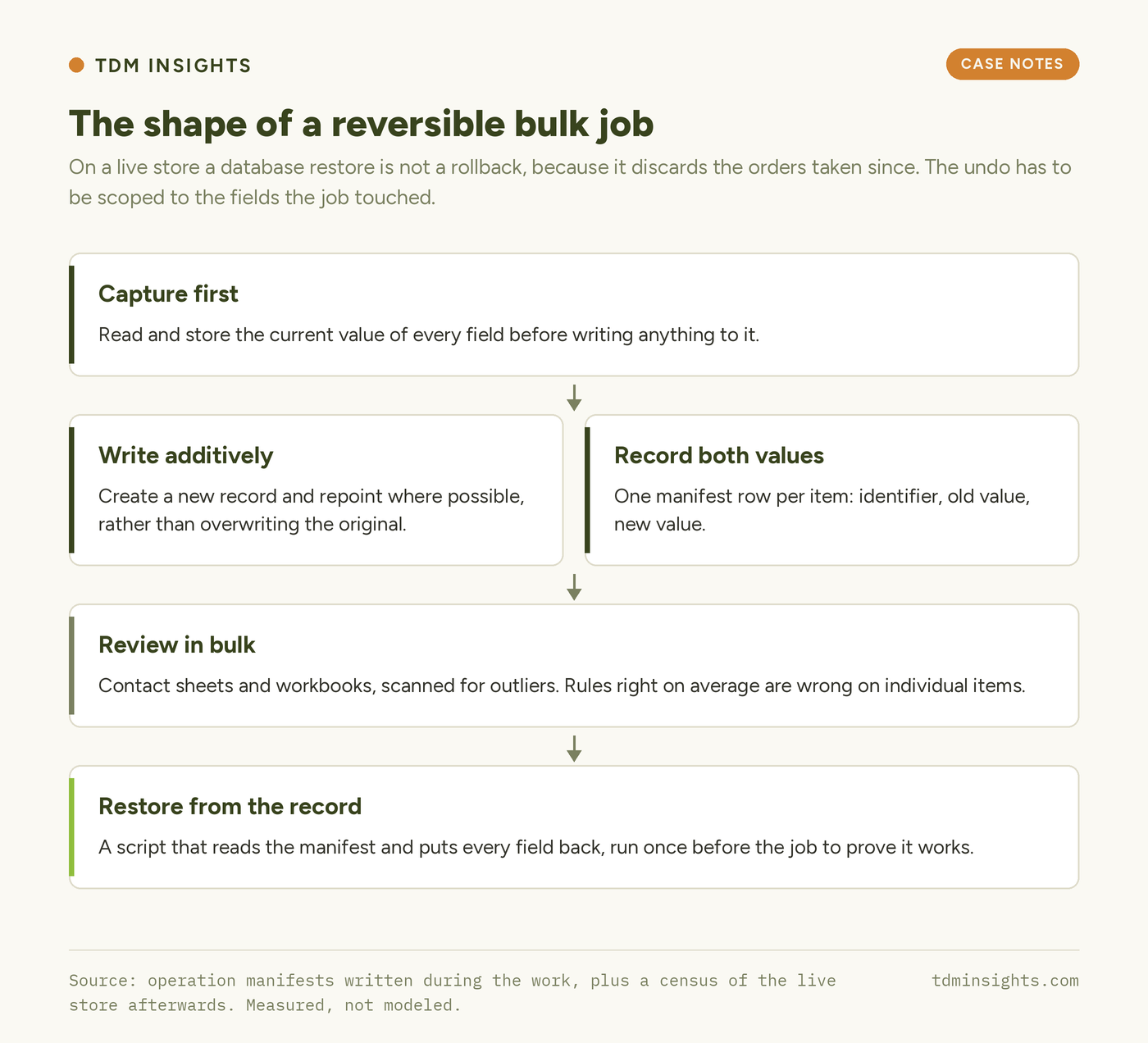
That last point is the one people miss. On a live store, a database restore is not a rollback. It is a rollback of everything, including transactions. Any real undo has to be scoped to the fields the job touched.
The shape that made both jobs safe
| Step | What it means in practice |
|---|---|
| Capture first | Read and store the current value of every field before writing anything to it. |
| Write additively | Where possible create a new record and repoint, rather than overwriting the original. |
| Record both | Write a manifest holding the item id, the old value and the new value, one row per item. |
| Restore from the record | Ship a script that reads the manifest and puts every field back, and run it once to prove it works. |
| Review before commit | Render the output as contact sheets or a workbook and look at it, in bulk, before it goes live. |
The image job is the clearest example of writing additively. Every re-cropped file was imported as a new attachment and the product’s thumbnail pointer moved to it. No original was modified or deleted. Reversal is a pointer change, which is instant and cannot lose data, and the manifest recorded the previous attachment id for all 175 images.
The description job could not be additive, because a product has one description field. So it was capture-first: the existing short and long descriptions were read into a backup file keyed by product id before a single row was written, and the restore reads that file back through the platform’s own CLI rather than touching the database directly.
The read
| Operation | Items | Reversal mechanism | Destructive |
|---|---|---|---|
| Product descriptions rewritten | 135 | Backup file of prior values, restored through the CLI | No |
| Product images re-squared | 175 | New attachments, thumbnail pointer restored from manifest | No |
| Category restructure | 6 categories | Term assignments recorded before the merge | No |
| Orphaned staging tables dropped | 72 tables | Compressed dump taken and stored off-server first | Yes, with a dump |
Only one operation in the whole engagement was genuinely destructive, and it was the one with the least judgement in it: dropping leftover tables from a staging clone. Even there the rule held, because a compressed dump was taken and copied off the server before anything was removed.
The visual review step earned its place more than once. Re-squaring an image means choosing how to fill the new space, and the right choice differs between a product shot on a seamless white background and an angled lifestyle photograph. The job picked a fill per image by measuring the edges it was extending, and every result was laid out as contact sheets and looked at before upload. Rules that are right on average are wrong on individual items, and only looking finds those.
What this teaches
- Write the restore before the write, and run it once. An untested rollback is a hope, not a plan.
- Capture the previous value of every field you touch, keyed by item id, in a file that outlives the session.
- Prefer additive operations. Creating a new record and repointing is reversible by definition; overwriting is not.
- Never rely on a database backup as the undo for a content job on a live store, because restoring it also discards real orders.
- Review bulk output visually and in bulk, as contact sheets or a workbook. Per-item rules that are correct on average fail on outliers.
- Scope the rollback to the fields the job touched. A good undo is narrow, fast and boring to run.
Frequently Asked Questions
How do you safely bulk edit WooCommerce products?
Capture the current value of every field before writing, store it keyed by product id, and ship a restore script that reads it back. Test the restore once before running the job for real. Review the output in bulk, then keep the manifest for as long as the change matters.
Is a database backup enough before a bulk product update?
Not on a live store. Restoring the database also reverts orders, customers and stock taken since the backup. A content job needs a rollback scoped to the fields it changed, so you can undo the edit without undoing the trading that happened after it.
What is a manifest in a bulk content operation?
A record written during the job holding one row per item: the identifier, the previous value and the new value. It is what makes reversal possible, and it doubles as the audit trail when someone asks months later why a particular product reads the way it does.
Should you overwrite product images or upload new ones?
Upload new ones and repoint the product to them. Overwriting destroys the original and any other use of it. Creating a new attachment and moving the thumbnail pointer is reversible instantly, costs only storage, and leaves the previous file intact.
How do you review hundreds of edited products?
In bulk, visually. Lay images out as contact sheets and text into a workbook, then scan for outliers rather than reading every item. Automated rules are right on average and wrong on the unusual cases, and those are exactly what a merchant notices first.
What makes a bulk catalogue change destructive?
Any operation that removes the only copy of something: overwriting a field without capturing it, deleting a file, or dropping a table. Destructive steps are sometimes necessary, but each one should be preceded by an export stored somewhere the operation cannot reach.
The takeaway in one line: do not start a bulk catalogue job until the command that undoes it exists and you have watched it work.
Facing a catalogue change you are nervous about? Planning the reversal is part of a free diagnosis.
Continue Reading:
More From This Project
- Ten Days Is a Sequencing Problem, Not a Speed One
- Why Category Pages Need an Answer Above the Grid
- A Setting Can Be Switched On and Still Do Nothing
More from TDM Insights
- Content Refresh: Win Back Rankings You Lost
- Title Tags and Meta Descriptions That Get Clicks
- Internal Linking: The Most Underrated SEO Lever
- Crawl Budget and Indexation for Small Sites
- Technical SEO for Founders: What to Fix First
Explore TDM Insights Topics