
Free Keyword Research: A Starter Method, No Tools
Autocomplete, People Also Ask, related searches, the SERP itself. Find demand you can win without paying for a single tool.
 By David Jubé · May 12, 2026 · 14 min read

Keyword research does not require a paid tool. It requires a method, and the signals that method runs on are already free, sitting inside the search bar you use every day.
The founder who waits to buy the right subscription before starting usually never starts. The one who opens Google, types a seed phrase, and reads what comes back has real demand in front of them inside ten minutes, no invoice required.
The short version: free keyword research means finding keywords worth writing for using five free signals Google hands you, then running each candidate through a quick gate before you commit a page to it.
Key takeaways
- You can find and qualify real search demand without a paid tool, using five free signals Google hands you, then running each candidate through one quick gate before you commit a page.
- The five signals are autocomplete (walk the alphabet to surface repeating phrases), People Also Ask, related searches, Google Trends plus Keyword Planner for directional size, and the live SERP itself.
- Long-tail phrases of four or more words carry higher intent and thinner competition, which makes them the right first target for a new site over high-volume head terms you cannot rank for.
- The SERP is your free, more honest difficulty score: read what kind of sites hold page one and how weak the weakest result is, because that weakest page is the one you actually have to beat.
- Run every candidate through three gates before writing: intent you can satisfy, a beatable page one, and a line to your business. Once you have traffic, add Search Console as the highest-signal source for near-miss queries.
The answer: five free signals, then one gate
You can find and qualify real search demand without spending a dollar. Google publishes the demand for you, scattered across the results page, and the live page of results tells you whether you can win the term. Read those signals in order and you have a working keyword shortlist before any tool would have finished loading.
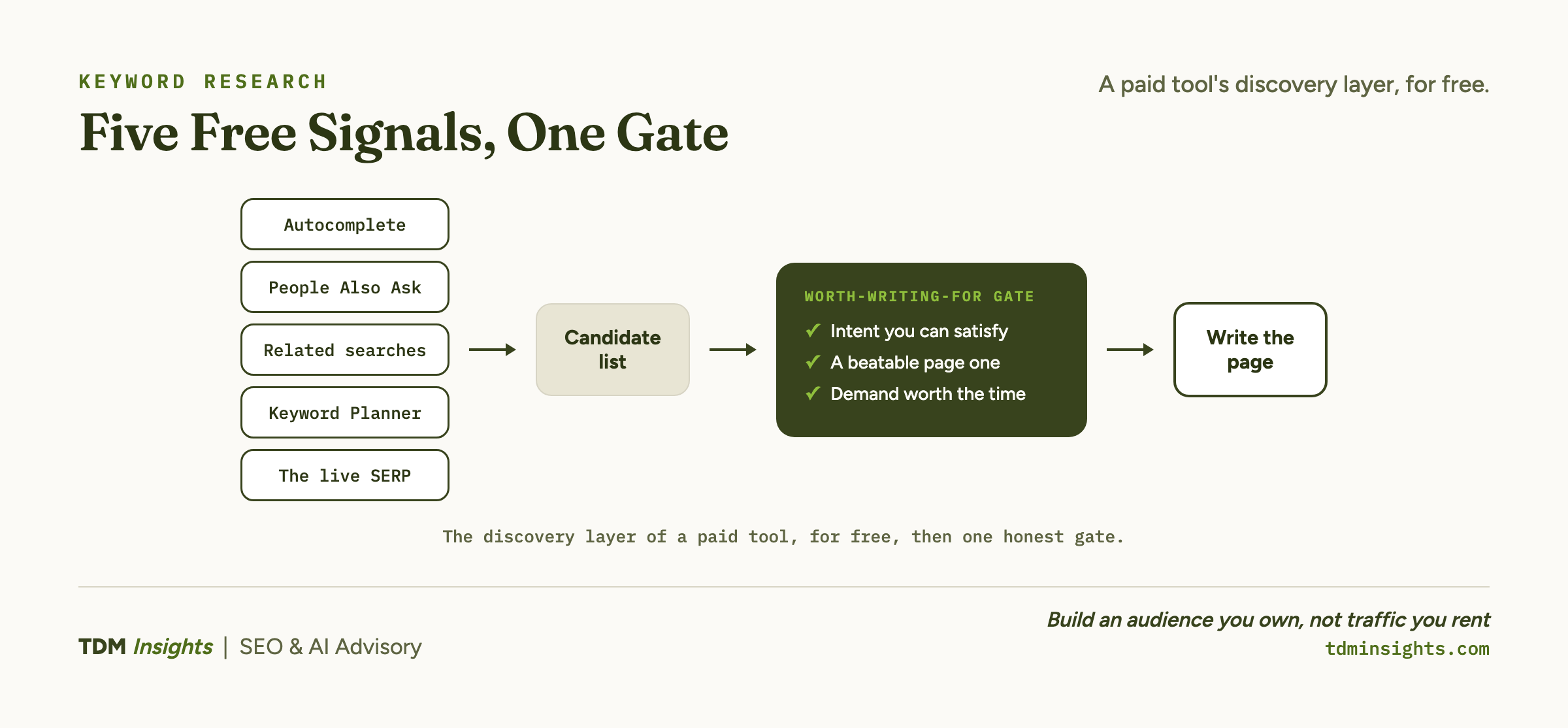
The five signals are Google autocomplete, the People Also Ask box, related searches, the live search results page (the SERP, the page of results you see after you hit enter), and Google Search Console once your site has any traffic. Each one is a different read on the same demand. Stacked together, they give you no-budget keyword research that replaces the discovery layer of a paid tool for a founder who is just starting.
What the free stack does not do is decide which of those terms deserve your limited time. That judgment, which demand is genuinely worth winning at your site’s current authority, is a separate step.
This article is the free starter method for finding queries. The strategy of choosing among them lives in which of those queries are worth winning, and you run it after the method below hands you a list.
Step 1: read Google autocomplete as a demand list
Type your seed phrase into the Google search bar and stop before you hit enter. The suggestions that drop down are predictions drawn from real searches, ordered roughly by how common they are. Google’s own explainer of how autocomplete works confirms the drop-down reflects actual query patterns, not guesses.
Start broad. If you sell project-management software for agencies, your seed is not “software.” It is “project management for agencies.”
Read every suggestion Google offers and write each one down.
Then widen the net deliberately. Type your seed followed by a single letter, “project management for agencies a,” then “b,” then “c,” and let autocomplete refill each time.
You are walking the alphabet through Google’s own demand index. The patterns that repeat across letters are the phrases with the most pull behind them.
This costs nothing and surfaces the actual language your buyers type, which is rarely the language you would have guessed.
Step 2: mine People Also Ask and related searches
Now hit enter and read the page, not the links, the structure.
The People Also Ask box (the expandable list of questions partway down the results) is Google telling you the exact questions searchers have around your topic. Expand one and it spawns more.
Each question is a candidate keyword and, just as useful, a candidate heading for the page you eventually write. A founder can build a demand-driven outline straight out of that box.
Scroll to the bottom for the related searches block, the grid of phrases Google associates with your term. These are the lateral queries: the adjacent intents and the longer, more specific phrasings.
Those longer phrasings matter especially for a new site. A four-or-more-word phrase like “project management for small creative agencies” is a long-tail keyword (a specific, multi-word query), and long-tail terms carry higher intent and thinner competition at the same time.
Ahrefs‘ breakdown of why long-tail keywords convert shows the trade between volume and winnability that makes these phrases the right first target. WordStream’s walkthrough of a step-by-step keyword research process covers the seed-and-expand pattern in more depth if you want a fuller workflow to run alongside this one.
Step 3: estimate demand without a paid volume number
You will want some sense of size before you write. You can get it free, as long as you treat the numbers as directional rather than exact.
Google Keyword Planner gives you volume ranges the moment you have a Google Ads account, no spend required. The figures come bracketed (“1K to 10K”) rather than precise, which is fine for a starting decision. Google’s Keyword Planner help confirms you can pull these ranges from a free account, and Backlinko’s guide to using Google Keyword Planner walks through the workflow step by step.
Google Trends adds the other half: relative interest over time, scored 0 to 100. It will not tell you a raw monthly number, and that 0-to-100 figure is normalized rather than absolute, a caveat Google spells out in how Google Trends data works.
Used right, Trends tells you whether a term is rising, flat, or seasonal, and lets you compare two candidates head to head. For the wider set of no-cost options beyond Trends, Ahrefs keeps a rundown of free keyword research tools.
For a new site, exact volume is the least decisive input anyway. A term with modest, steady demand and a beatable results page is worth far more than a high-volume term you cannot rank for.
Why the SERP is your free difficulty score
The single most valuable free signal is the one founders skip: the results page itself, read closely.
A paid tool prints a keyword difficulty score and you trust the number. The page of results gives you the evidence behind that number, free, if you look at who is actually ranking.
Moz‘s primer on keyword research and difficulty makes the same point: the competition on page one is the real difficulty signal. Two questions decide it.
- What kind of sites hold page one? If the top ten are all deep-authority brands with long histories, the term is defended hard and a new site will not break in soon. If you see forum threads, thin posts, off-topic pages, or a no-name site or two, the field has soft spots.
- How weak is the weakest result? That is the page you actually have to beat for a foothold. A thin article on a small site at position nine is your opening.
Reading the page this way is its own short skill, covered in full in how to read the SERP to qualify the keyword. The takeaway here is that the SERP is a free difficulty score, and a more honest one than any single number, because you are looking at the real field instead of an estimate of it.
Book a free diagnosis
Reading difficulty off the live results page is the judgment founders get wrong most, and it is the judgment that decides whether a page you write ever ranks. A free diagnosis runs a first keyword-and-page pass on your site, no tools required of you. We surface a handful of terms with demand you can plausibly win this quarter, show where the buyer intent sits, and flag what to publish first. No deck, no obligation, just a clear read.
Step 4: add Search Console once your site has traffic
The free signals so far work before you have any traffic. The moment you do have some, a sixth signal opens up that is higher-quality than the rest combined.
Google Search Console shows the real queries your site already appears for, including ones you never targeted on purpose. The Performance report lists terms where you rank on page two or low page one, the near-misses.
Those are demand you have half-earned already, and a focused page or a stronger existing one can often push them up. Google’s own Performance report help explains how to read the queries, impressions, and average-position columns for exactly this.
This is the highest-signal free source you have, because it is your real demand, not an estimate of someone’s. Check it monthly once traffic starts arriving. If you want a fuller end-to-end research workflow to layer on top of these free signals later, Search Engine Journal’s guide to keyword research maps the paid-tool steps you can graduate into.
Here is the whole free stack in one view, with what each source gives you and how to put it to work.
The worth-writing-for gate
A list of candidate keywords is not a plan. Before a term earns a page, run it through three quick questions. All three have to clear.
- Intent you can satisfy. Does the query want something you actually offer? Check the intent before you commit, because a term searched by the merely curious will not convert no matter how you rank for it.
- A beatable page one. From the SERP read above, is the weakest result genuinely beatable, or is it wall-to-wall established brands?
- A line to your business. Does the term connect to something you sell, directly or one click away?
If all three hold, the term is worth writing for. If the results page is solid authority top to bottom, or the intent is wrong for you, set it aside for later rather than burning a page on it now.
That gate is deliberately rough. It is meant to sort a long free list into a short worth-it one in a single sitting, not to rank candidates against each other with precision.
A worked example: finding one winnable term
Say you run a booking tool for independent yoga studios. Seed phrase: “yoga studio software.”
- Autocomplete offers “yoga studio software free,” “yoga studio scheduling software,” and “best software for small yoga studios.”
- People Also Ask asks “what software do yoga studios use” and “how do small studios manage class bookings.”
- Related searches at the foot of the page include “class booking software for small studios.”
That last phrase is the one to test. You search it. Page one is a mix of two large fitness-platform brands and several thin roundup posts and dated blog articles, with one small competitor’s feature page sitting at position eight.
The weakest result is beatable. The intent is commercial: a studio owner shopping for a tool. It connects directly to what you sell.
It clears all three gates. A 27,000-search head term like “scheduling software” would have failed the beatable-page-one test on its own. The specific phrase, with a fraction of the volume and a soft results page, is the one a new site can actually win.
That is the whole method in one pass: free signals surface the candidates, the SERP reveals the soft spot, the gate confirms the term is worth a page.
From free keyword research to a real plan
A qualified keyword is a starting point, not a finished strategy. Two moves turn the list into something you can act on.
- Build the page that wins it. Once you have a term that clears the gate, build the page that wins it around that single intent rather than scattering the topic across thin posts.
- Sequence the qualified terms. When you have a stack of them, decide which to publish first, how they group into clusters, and what cadence the runway can support. That is where a free keyword list becomes a publishing plan, and it is the bridge from free keywords into a publishing plan that gives the whole effort a calendar.
The tool you do not need yet is the volume estimator. The work you cannot skip is the reading: the autocomplete list, the questions box, the results page. Start there today, free, and the paid subscription becomes a speed upgrade you buy later, once the volume of research justifies it, not a gate you wait behind to begin.
Frequently Asked Questions
How do I do keyword research for free?
Use the free signals Google gives you: type seed phrases into the search bar and read autocomplete suggestions, open the People Also Ask box, and scroll to the related searches at the bottom. Add Google Trends for relative interest and Search Console once your site has traffic. Together these surface real demand without any paid subscription.
Can you do keyword research without paid tools?
Yes. You can find and qualify keywords using only free sources: Google autocomplete, People Also Ask, related searches, the live results page, Google Trends, Keyword Planner, and Search Console. Paid tools add volume estimates and difficulty scores faster, but the free stack is enough to start, especially for a new site targeting long-tail terms.
How do I find keyword search volume for free?
Google Keyword Planner gives free volume ranges when you have a Google Ads account, though figures are bracketed rather than exact. Google Trends shows relative interest over time on a 0 to 100 scale. For a new site, exact volume matters less than intent and winnability, so treat free ranges as directional, not precise.
How do I use Google autocomplete and People Also Ask for keyword research?
Type a seed phrase and note the autocomplete suggestions, which reflect real popular searches. Then open the People Also Ask box for related questions people actually ask, and expand a few to surface more. Each suggestion is a candidate keyword or section heading. This gives you a demand-driven outline straight from Google, at no cost.
How do I find long-tail keywords without a tool?
Add modifiers to a seed phrase in the search bar (best, for, how to, near, vs) and read the autocomplete and related searches. Mine the People Also Ask box and the related-searches block. These specific multi-word phrases are long-tail keywords, and they are exactly the low-competition terms a new site can realistically rank for.
How do I know a keyword is worth writing for before I have data?
Run a quick gate: does the query show clear intent you can satisfy, is the page-one competition beatable (forums or thin pages, not only big brands), and does it connect to something you sell? If all three hold, it is worth writing. If the SERP is wall-to-wall high-authority sites, save it for later.
Continue Reading:
More On On-Page SEO:
- How to Structure a Page to Rank (and Get Cited)
- Title Tags and Meta Descriptions That Get Clicks
- Search Intent: The Four Types That Decide Everything
- Internal Linking: The Most Underrated SEO Lever
- How to Read the SERP Before You Write a Word
More from TDM Insights:
- Keyword Research for Startups: Demand You Can Win
- Content Strategy for Founders
- SEO for Startups: What to Do in the First 90 Days
- How Many Blog Posts Do You Need to Rank?
- Topic Clusters and Pillar Pages: How They Work
Explore TDM Insights Categories: