
AI Overviews and the Six Schema Types a Build Emits
AI Overviews need specific structured data. See what each build path emits by default, and which fields you have to write yourself.
 By David Jubé · Jul 23, 2026 · 15 min read
Every build path emits structured data on your behalf, and whether an answer engine can use it depends on whether those fields describe you or your category.
“Schema is handled, the build does that part.” That is the answer a founder gives when you ask who wrote the structured data on a new site, and it is not wrong. Something is being emitted, because rendering a page and describing that page have become the same job for a modern template.
What differs is what got described. A default block names a page type, a site name and a URL, all of which are true of your page and equally true of every other page built from that template. Handled means present, and no default has ever known a fact about you that nothing else on the web asserts.
That gap sits on rung four of the Citability Ladder, Structure, the rung a build handles for you and therefore the one nobody opens. Schema Markup for AI covers structured data for answer engines in general, which types tend to earn citations and why. What follows is the narrower case: the markup your build wrote for you, what is generic in it, what is wrong in it, and what a person still has to supply.
Key takeaways
- Structured data is rung four of the Citability Ladder, and a build handles it by default, which is why nobody reads it. Different paths emit different defaults, so what sits on your pages was decided before any copy existed.
- Generic markup is not neutral. It fills the slot a specific claim about your business belongs in, and names your template instead.
- Markup that contradicts the visible page is worse than no markup, because it is a claim you cannot support where it appears.
- Generating JSON-LD is fast and well suited to AI. Deciding what belongs in it is the part that needs you.
Handled means present, and present is not the same as specific
Structured data is a machine readable description of what a page says, written in a shared vocabulary so a crawler does not have to guess. Schema.org is that vocabulary, JSON-LD is the usual format, and “schema markup” is the everyday name for the result. The schema.org documentation walks through it from first principles.
Markup can be entirely valid and still say nothing. A block declaring your services page is a WebPage belonging to a WebSite passes every check available, because a validator grades syntax rather than substance, and a page that is a page on a site that is a site is a description no engine can act on.
Markup earns its place when it carries a fact an engine cannot reconstruct from the page’s category: a service area, a credential, a specific offer, a person accountable for the page. Those are the fields nobody’s default can fill, and they are also the fields nobody checks, because the block above them looks complete.
Different build paths emit different defaults
Structured data does not appear because someone configured it. It appears because a template, theme or SEO plugin describes every page it renders, including the ones nobody described.
What each category of build emits differs, consistently enough to plan around:
- Hosted site builders emit a tightly controlled block, usually WebSite and WebPage plus an Organization stub, filled from your account settings. Reliable, shallow, and limited to what the platform exposes.
- A content management system with an SEO plugin emits a connected graph rather than isolated blocks, tying Organization, WebSite, WebPage and Article together with cross references, as Yoast’s structured data graph documentation sets out in full.
- Custom and headless builds emit whatever a developer wrote, so the markup is excellent where someone specified it and absent where nobody did.
A default has to be generic, because it serves every site the tool renders. What it means for you is that the markup on your pages was settled before a line of copy existed, at journey position 1, WordPress Site Design: Builder, Parent Theme or Code, which argues the real question is custody: who holds your content layer, and what you may change in it.
Emitted structured data is that custody question made visible. Whether you can suppress a block, override a field, or only add alongside it was decided back there, and it sets the ceiling on everything below.
Only a few types earn their place on a new site, and your structure generates several
Schema.org carries hundreds of types. A new site needs six, and their fields do the work.
- Organization or LocalBusiness, once, on the home page. The fields that carry weight are the verifiable ones: legal name,
url,sameAsprofiles you control, andareaServed. - WebSite, once, with your site name. Thin by design, and worth carrying because it names the entity the graph hangs from.
- Article or BlogPosting on each post, where
author,datePublishedanddateModifiedmatter. The schema.org Article type lists what else exists, and you need few of them. - Service or Product on the pages that earn money, where the specifics live: what is delivered, who for, where.
- BreadcrumbList on everything below the home page.
- FAQPage only where a visible, answerable FAQ exists on the page itself.
Breadcrumbs deserve a second look, because you do not write them. They are generated from your hierarchy, as are the parent and child relationships inside your page type markup, which means they report your site structure back to a crawler whether or not that structure was designed.
If your breadcrumbs assert a hierarchy your site does not have, the markup is not the bug. The structure is, and every page inherits it. Fix the hierarchy first and re-inspect afterwards, because correcting the output page by page leaves you with one accurate page and a site full of wrong ones. That order is journey position 3, Site Structure for a New Website: The Two Numbers, and it comes before any JSON-LD.
Emitted versus hand written, compared across your real templates
Each of these templates exists on almost every new site, and each carries a different gap between what the build asserts and what a person still has to say.
Every entry in that final column is a fact about your business rather than your page format, and together they are the whole of the work on this rung. Generic markup is not harmless while that work goes undone, because it occupies the slot a specific claim belongs in and looks finished sitting there.
In practice
Founders rarely find broken markup on a new site. They find valid markup that describes a category, passes every validator, and gives an engine no reason to name them rather than anyone built the same way.
Inspecting what your pages carry right now takes one page and three minutes
You cannot decide what to add until you know what is already there, and reading it takes minutes rather than an afternoon.
- View source on your home page and search for
application/ld+json. Every JSON-LD block appears there in full, the only view showing what was emitted rather than what a tool concluded. - Paste the URL into a testing tool and read the parsed output. Google’s Rich Results Test reports eligibility for search features and the Schema Markup Validator reports what the vocabulary says, which are separate questions.
- Repeat on one URL of each type, home, service, post, contact. Markup is emitted per template, so one example tells you what every URL on that template carries.
- Count the blocks, not just the errors. Two
application/ld+jsonblocks on one page is the finding a pass or fail verdict hides.
Reading raw output rather than a verdict is the step people skip, and it is the step that finds the duplicates. MDN on implementing structured data helps here, because seeing how attributes bind to content makes a block that has drifted from the copy obvious on sight.
Past a few dozen pages this becomes a crawl rather than a read. A walkthrough of structured data validation covers gap analysis across a site, and a reference on auditing structured data at scale covers the metrics worth tracking as the page count grows.
What everyone else emits sets the baseline you are measured against. The Web Almanac’s structured data measurements track what appears across the crawled web, and Semrush’s data on schema adoption reads the same layer through AI search.
Conflicts cost you more than gaps, so triage them first
An inspection produces two kinds of finding, and they are not equal.
A gap is a missing block. Nothing asserts your service area, so nothing can be cited about it, and the fix is additive and cheap.
A conflict is an assertion fighting another assertion, and it is the expensive one. Google’s general structured data guidelines are direct about the rule underneath: markup has to represent content visible on the page. A block claiming what the page does not say becomes unsupportable at the exact moment an engine checks it against the rendered copy.
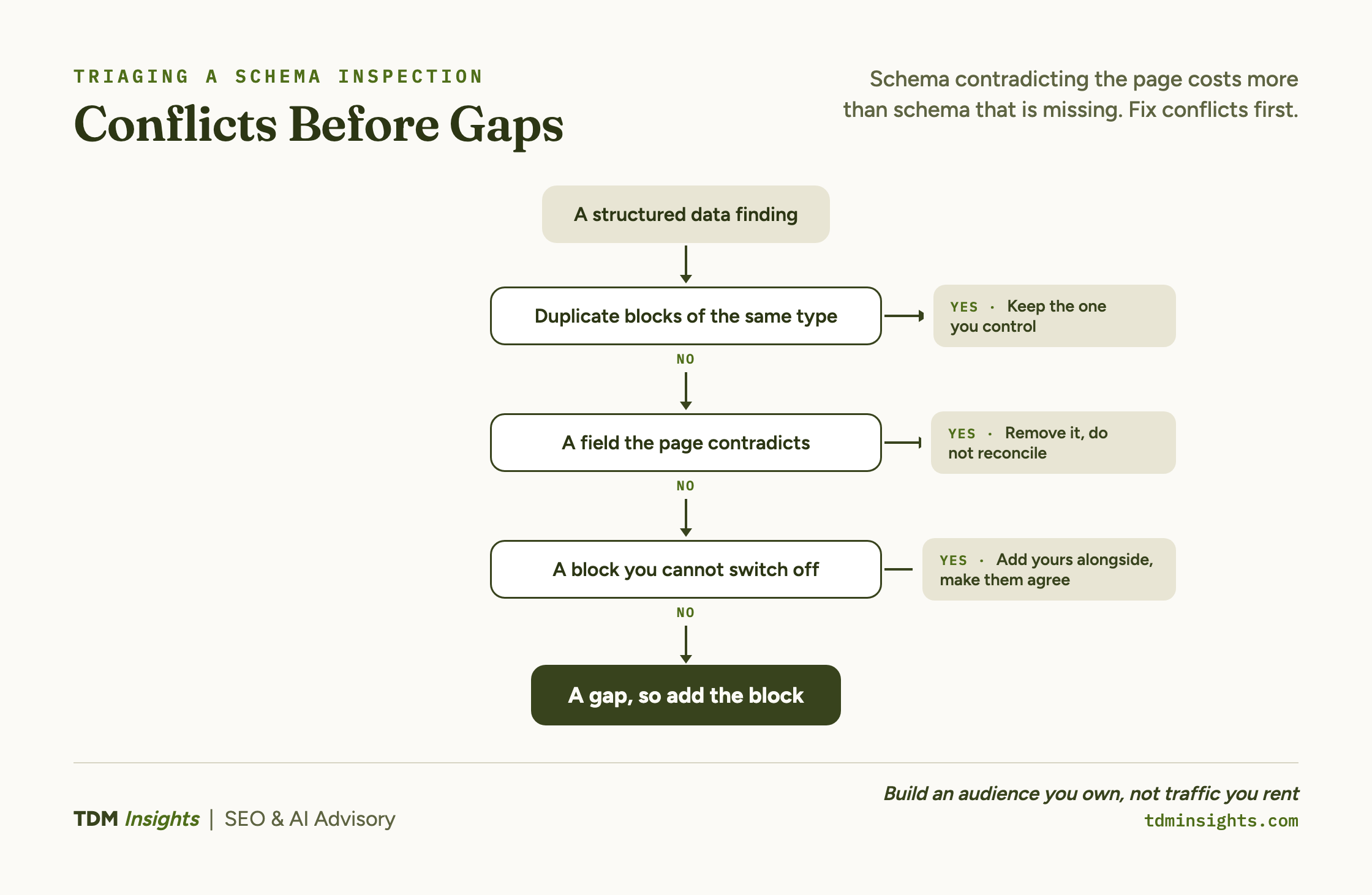
Three conflicts show up on new sites, and each has a different answer.
- Duplicate blocks of the same type. A theme emits an Organization block and an SEO plugin emits a second, so a crawler gets two competing descriptions of one business. Keep the one you control, turn the other off at source.
- A field the page contradicts. Emitted opening hours the contact page does not show, or a review count no page displays, are ones to remove rather than reconcile. Deleting an unsupported field is smaller work than writing the copy that would justify it.
- A block you cannot switch off. A hosted platform may emit a block with no setting behind it. Add your own specific block alongside, make the two agree on every shared field, and live with the redundancy.
Which of those three you are looking at depends on what your build path lets you reach, which is why the custody question decided at position 1 keeps returning here.
Writing the block a default leaves out, with a worked example
A service page on a hypothetical restoration business emits this unaided:
{
  "@context": "https://schema.org",
  "@type": "WebPage",
  "name": "Structural drying",
  "url": "https://example.com/services/structural-drying/",
  "isPartOf": {
    "@type": "WebSite",
    "name": "Example Restoration",
    "url": "https://example.com/"
  }
}
Nothing there is false. Nothing there is about the business either, which is why it earns no citation.
The hand written block beside it names the offer, the provider and the scope:
{
  "@context": "https://schema.org",
  "@type": "Service",
  "name": "Structural drying for water damaged timber floors",
  "serviceType": "Water damage restoration",
  "url": "https://example.com/services/structural-drying/",
  "provider": {
    "@type": "LocalBusiness",
    "name": "Example Restoration",
    "url": "https://example.com/",
    "foundingDate": "2019",
    "sameAs": ["https://www.linkedin.com/company/example-restoration/"]
  },
  "areaServed": {
    "@type": "AdministrativeArea",
    "name": "Greater Toronto Area"
  },
  "audience": {
    "@type": "Audience",
    "audienceType": "Residential property owners and insurance adjusters"
  }
}
Six fields carry the difference: the specific service name, serviceType, foundingDate, sameAs, areaServed and audience. Each one is a claim the visible page makes in words as well, and holding to that constraint is what keeps the block defensible when something checks it.
Producing valid JSON-LD once you know what belongs in it is fast, mechanical work well suited to an AI assistant. Hand it the page copy, name the type, and ask for only the fields that copy supports. Yoast’s structured data implementation guide covers deployment, and an llms.txt file substitutes for none of it. The instruction that keeps a generated block usable is the negative one: no field the page does not support.
Deciding which fields describe you, and which describe your category
Every remaining decision on this rung is one question, asked repeatedly. Does this field describe my business, or my category?
priceRange on a business that has published no prices describes a category. areaServed naming three municipalities you work in describes you. Both validate, and only one earns attention.
Declaring every available field produces markup that says nothing loudly, because a description assembled from category level facts is a description of the category. Three specific fields beat thirty generic ones, and they stay true for longer, which matters on a site that gets edited.
Run each candidate field through two tests.
- Is it verifiable off the page? A
sameAslink, a credential, a registered name and a location can be checked elsewhere, which is what makes them useful to an engine reading you cold. That is rung two, and markup helps there only when the facts point outward. - Is it stated on the visible page? If a reader cannot find the claim in the copy, remove the field or write the copy. Writing the copy is usually the better move, since it fixes the page and the markup in one pass.
Keeping the set small pays later as well. A short block survives a redesign, and a thirty field block goes stale the first time somebody edits a page without opening the markup, which is every time. Keeping that layer maintained rather than audited once is what the Growth Engine is for.
Four rungs of the ladder are now on the table, and the question left is not technical. It is which of these calls you make yourself and which you hand to somebody who has made them before.
Book a free diagnosis
A free diagnosis reads what your live pages emit, separates the generic blocks from the conflicting ones, and hands you the conflicts to fix first.
Frequently Asked Questions
What is the difference between structured data and schema markup?
Structured data is the general practice of describing a page in a machine readable way. Schema markup is structured data written in the schema.org vocabulary, which is the one search and answer engines read. The distinction that changes outcomes is not vocabulary, it is whether the fields you declare are generic or specific to your business.
How do you see the schema markup of a website?
View the page source and search for application/ld+json, which shows every block exactly as your build emitted it. A testing tool then parses the same page and reports whether it is valid. Read the raw source as well as the verdict, because a single verdict hides duplicate blocks, the finding that changes what you do next.
Does schema markup help SEO?
Schema markup helps by making rich results possible and by making your facts machine readable, but it is not a ranking input you can turn up. The rule worth carrying: markup that contradicts what the visible page says is worse for you than carrying no markup, because it is an unsupported claim checked at the moment of evaluation.
What are the different types of schema markup used in SEO?
Schema.org defines hundreds of types, and a new site needs six: Organization or LocalBusiness, WebSite, Article or BlogPosting, Service or Product, BreadcrumbList, and FAQPage where a visible FAQ exists. The fields inside them carry the weight, particularly sameAs, areaServed, author and dateModified, which describe you rather than your content format.
What is the recommended format for implementing schema markup?
JSON-LD is the recommended format, placed in a script block in the page head or body, and it is what every major build path emits. The case nobody covers is a second conflicting block your build emits and you cannot switch off. Add your own specific block alongside it, and make both agree on every shared field.
What is a schema markup generator?
A schema markup generator produces valid JSON-LD from fields you fill in, which is genuinely useful for syntax. It fills the same default fields your build already emits, and it has no way to fill the ones that matter: your service area, your credentials, your sameAs profiles, your founding date. Those describe you rather than your category.
Continue Reading:
Previously in this series
- AI SEO Audit: Finding the Copy Your Template Shipped, the shared phrasing a template ships, which generic markup then names instead of you.
Next in this series
- AI SEO Services: Six Flex Points and Who Decides, where a person still decides, once the structure is emitted and validated.
From the library
- Structured Data for SEO: The Founder’s 80/20, the five schema types worth adding, and why the rest earn nothing.
- How to Show Up in Google AI Overviews, how an AI Overview retrieves and evaluates before it ever reads your markup.
- How to Structure a Page to Rank and Get Cited, matching intent and structure first, before deciding what your markup should claim.
- Comparison Tables and Formats LLMs Love to Cite, ranked tables and lists earn citations no schema type can substitute for.
Explore TDM Insights Categories