
Legacy Content Is Authority You Already Paid For
A replatform is where archives quietly die. Fifty-two addresses reconciled one at a time, and the query rule behind every merge.
 By David Jubé · Jul 15, 2026 · 7 min read
An independent school moved off a hosted website builder onto WordPress in July 2026. The build was the straightforward part. The day that decided how the new site would perform came earlier, when we sat with a list of 52 old addresses and worked out, line by line, which of them were allowed to disappear.
The default line in a replatform scope is that the old blog does not come across. It is one sentence, it saves a week, and it is usually the most expensive decision in the project.
How to read this: one completed engagement, measured. The client is not named. Scores are Google PageSpeed Insights lab runs taken on the live site before cutover and again after launch, reported on the weaker of mobile and desktop. Counts come from a full page and post census at both points. Measured, not modeled.
Key takeaways
- In a migration the question is not whether old content is good. It is whether the authority attached to it is recoverable.
- Merge by query intent, not by click count. A page with traffic can still be a doorway rather than a destination.
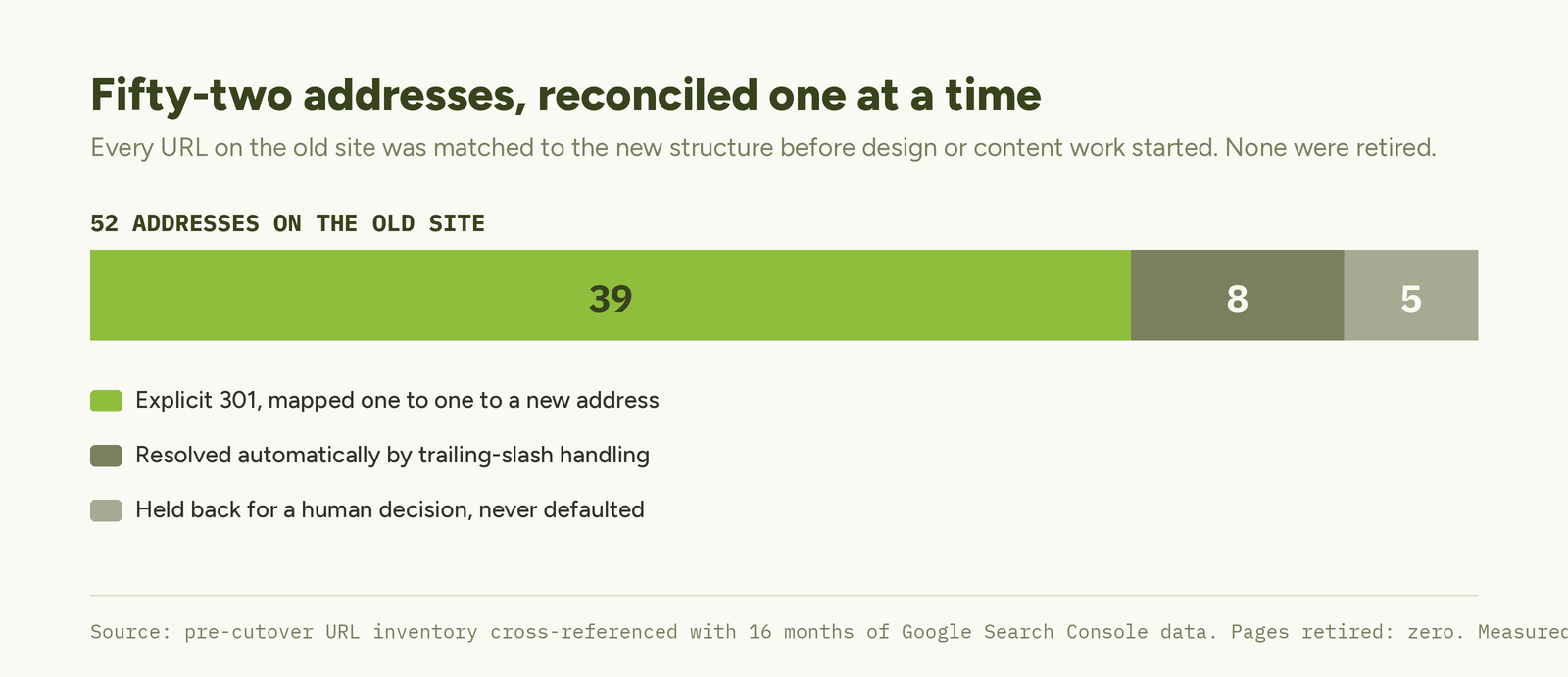
- 52 addresses reconciled one at a time, 39 explicit redirects, zero pages retired by default.
The starting point
A small archive: 18 posts, several years old, written well before anyone was thinking about search. None of it built to a keyword. By the usual scoring, the least valuable content on the site.
The search data said otherwise. Roughly 40 percent of the site’s lifetime organic clicks came from the brand name alone, so non-brand visibility was thin and the archive was most of what existed outside it. Those posts carried years of page age, real named authors, and whatever links they had picked up along the way. New keyword-led content starts with none of that.
Reconcile before you design
Before any design or content work we inventoried every address on the old site and matched each one to the new structure. A platform move with URL changes is a URL-level problem, and it is far cheaper to solve on a spreadsheet than after launch. Most migration checklists agree on the order even when they disagree on everything else: inventory, map, then design.
| Disposition | Count |
|---|---|
| Addresses inventoried on the old site | 52 |
| Matched to an explicit 301 redirect | 39 |
| Resolved automatically by trailing-slash handling | 8 |
| Held back for a human decision | 5 |
| Flagged as carrying most of the organic clicks | 6 |
| Posts migrated | 18 |
| Posts whose address had to change | 18 |
| Posts that also needed a new slug | 4 |
| Pages retired | 0 |
Every post address changed, because the old platform prefixed each one with a folder the new site had no reason to keep. That alone meant 18 permanent redirects, four of which also carried a slug change.
The rule that did the work
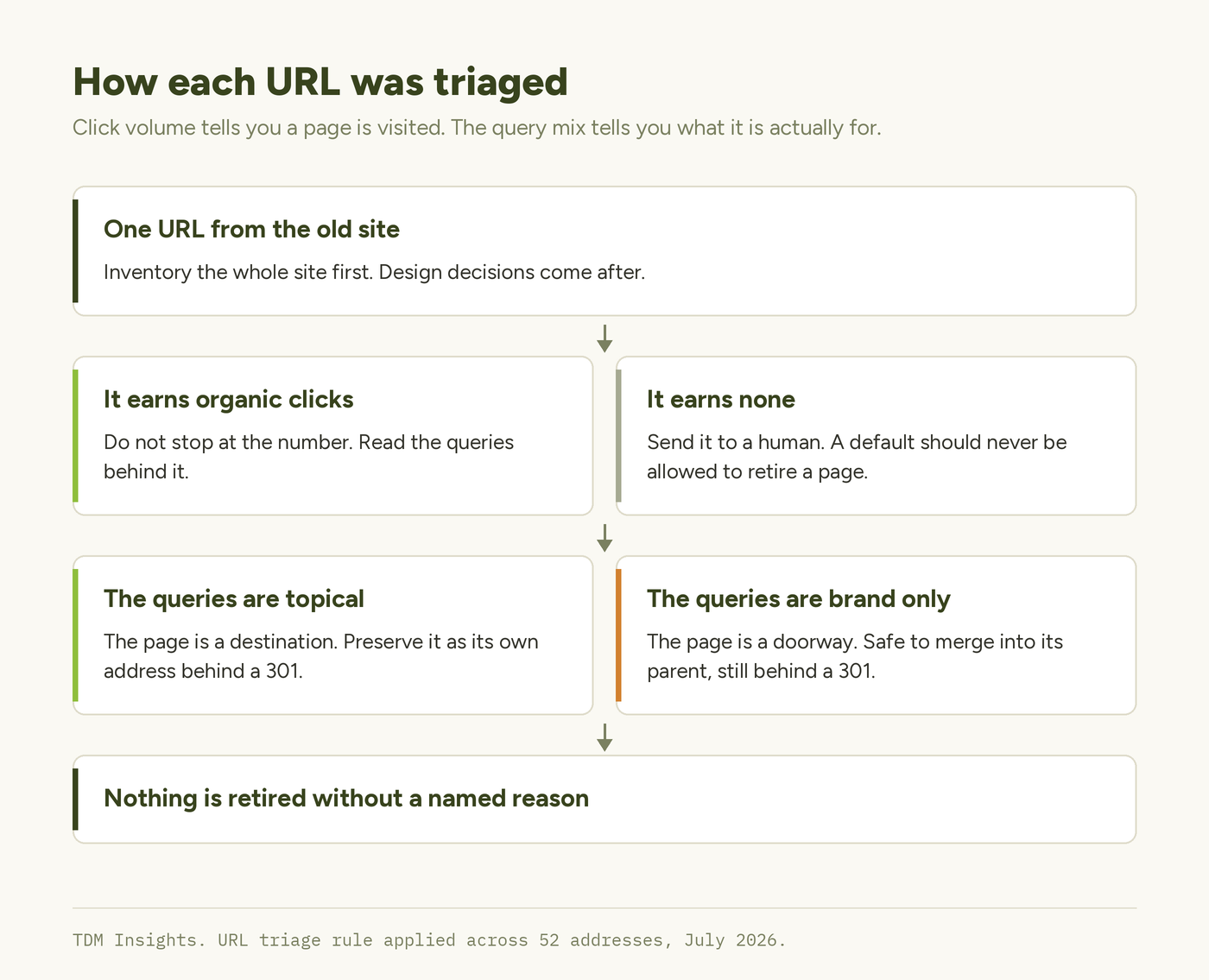
The merges were the interesting decisions. One catalogue page ranked in the top handful of pages by organic clicks, so folding it into a parent looked like throwing traffic away.
Then we read the queries behind those clicks. Every one was the brand name. Nobody had arrived through a search for what the page was about. It was a doorway sitting on a well-known name, not a destination. Merging it cost nothing, and the same evidence would have stopped the merge instantly had the queries been topical.
Three smaller decisions followed the same principle of never letting a default decide. Original publication dates were kept rather than restamped, because age is part of what makes an archive credible. Bylines that existed only as a line of body text became real author records, so the attribution turned into data. Five ambiguous legacy pages went to a human rather than to a rule.
What travels and what does not
Be precise about what a redirect preserves, because the honest answer is most but not all. The type matters too: a temporary redirect passes far less than a permanent one, and a chain of hops passes less again, so map old addresses straight to their final destination rather than through whatever they became in between.
| Asset attached to an old page | Travels via 301 | If retired |
|---|---|---|
| Accumulated external links | Yes, indirectly | Lost |
| Ranking history for that URL | Largely | Lost |
| Page age | Yes | Lost |
| Author attribution | Only if re-created | Lost |
| Internal link equity | Has to be rebuilt | Lost |
The inventory earns its cost even when you expect to keep everything. It forces someone to look at every address a site has accumulated, which reliably surfaces two or three pages nobody remembered publishing.
What this teaches
- Reconcile the whole URL inventory before design or content work starts. It is a one-day job before launch and a quarter-long recovery afterwards.
- Merge by query intent, not by page title and not by click count. Volume says a page is visited. The query mix says what it is for.
- Keep original publication dates. Restamping an archive to look fresh trades a real signal for a cosmetic one.
- A byline written as body text is invisible to machines. Store it as an author record so the attribution is structured.
- Anything ambiguous gets a human, not a default. A default that retires a page is the one decision in a migration you cannot undo.
- Retiring a page is unrecoverable. Redirecting it is not. When the two are close to equal cost, that asymmetry should decide.
Frequently Asked Questions
Should you keep old blog posts when migrating a website?
Keep them unless you have a specific reason not to. Old posts carry page age, accumulated links and ranking history that new content cannot buy. Migrate them behind 301 redirects and improve them in place afterwards. Retiring a page discards authority you have already paid for.
What is a 301 redirect and when should you use one?
A 301 tells search engines a page has moved permanently and passes most of its ranking signals to the new address. Use one whenever a URL changes, including slug edits, folder changes and merges. Without it the old address becomes a dead end and its history is lost.
How do you decide whether to merge or keep a page in a migration?
Read the queries, not the click count. If a page’s clicks come from topical searches it is a destination and deserves its own address. If they all come from the brand name it is a doorway, and it can fold into its parent behind a redirect.
Should you change publication dates when migrating content?
No. Keep the original dates. Age is part of what makes an archive credible, and restamping dates to look fresh is a cosmetic signal that readers and search engines both discount. Update the content itself if it is out of date and let the date stay true.
How many URLs need redirecting in a website migration?
Every address that changes, which on a small site is usually most of them. Platform prefixes, folder renames and dropping www all change URLs. Inventory the whole site first: this migration mapped 52 addresses, of which 39 needed an explicit redirect.
Does an author byline affect SEO?
Written as a line of body text it does very little. Stored as a real author record it becomes structured, attributable data that supports experience and expertise signals. If a named person wrote the piece, make that a field the site can output rather than a sentence.
The takeaway in one line: decide what survives on evidence, one URL at a time, because a redirected page keeps compounding and a retired one is gone.
Planning a replatform and not sure which addresses are load-bearing? Mapping that is part of a free diagnosis.
Continue Reading:
More From This Project
- When to Stop Tuning a Site and Rebuild It Instead
- Structure the Archive Before You Write Anything New
More from TDM Insights
- Internal Linking: The Most Underrated SEO Lever
- Content Refresh: Win Back Rankings You Lost
- Crawl Budget and Indexation for Small Sites
- Why Isn’t My Site Indexed? A Founder’s Diagnostic
- Writing for E-E-A-T: Prove Experience on the Page
Explore TDM Insights Topics